
DP-300 · Question #327
Hotspot Question You have an instance of SQL Server on Azure Virtual Machines named VM1. You need to use an Azure Automation runbook to initiate a SQL Server database backup on VM1. How should you…
This question tests knowledge of using Azure Automation runbooks to execute commands on Azure Virtual Machines via the Invoke-AzVMRunCommand cmdlet, specifically to trigger a SQL Server backup.
Question
Exhibit
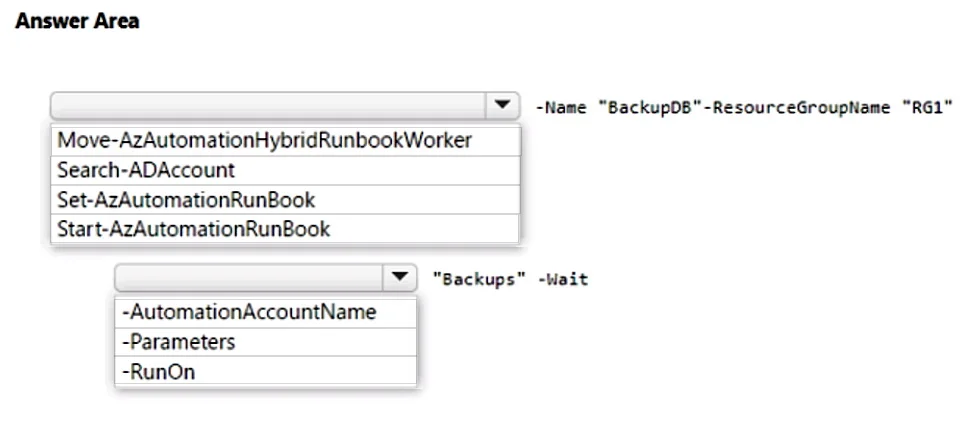
Answer Area
- CmdletMove-AzAutomationHybridRunbookWorkerSearch-ADAccountSet-AzAutomationRunBookStart-AzAutomationRunBook
- Parameter-AutomationAccountName-Parameters-RunOn
Explanation
This question tests knowledge of using Azure Automation runbooks to execute commands on Azure Virtual Machines via the Invoke-AzVMRunCommand cmdlet, specifically to trigger a SQL Server backup.
Approach. The correct command structure uses 'Invoke-AzVMRunCommand' to run a script on VM1. The full command would be: Invoke-AzVMRunCommand -ResourceGroupName '<ResourceGroup>' -VMName 'VM1' -CommandId 'RunPowerShellScript' -ScriptPath '<path-to-script>' or using -ScriptString with inline SQL backup T-SQL or PowerShell. The key selections are: the cmdlet 'Invoke-AzVMRunCommand' (to remotely execute a command on the Azure VM), the '-CommandId' parameter set to 'RunPowerShellScript' (to specify that a PowerShell script will be executed on the Windows VM), and the '-ScriptString' or '-ScriptPath' parameter to pass the backup logic. This approach allows Azure Automation to trigger the SQL Server backup without requiring direct network connectivity to the VM, using the Azure VM agent as the communication channel.
Concept tested. The concept tested is Azure Automation integration with Azure Virtual Machines using the Invoke-AzVMRunCommand PowerShell cmdlet. This cmdlet leverages the Azure VM Guest Agent to run scripts directly on the VM, bypassing the need for open network ports or direct VM access. Key parameters include -CommandId 'RunPowerShellScript' for Windows VMs and either -ScriptPath or -ScriptString to provide the script content that initiates the SQL Server backup (e.g., using T-SQL BACKUP DATABASE command via sqlcmd or SMO).
Reference. https://learn.microsoft.com/en-us/azure/virtual-machines/windows/run-command
Topics
Community Discussion
No community discussion yet for this question.