
DP-300 · Question #290
Hotspot Question You have an Azure subscription that contains an instance of SQL Server on Azure Virtual Machines. The virtual machine hosts a database named DB1. You need to monitor DB1 by using…
The correct answer is package0.: event_file; EVENT_RETENTION_MODE=: ALLOW_MULTIPLE_EVENT_LOSS. This question tests knowledge of Extended Events in SQL Server, specifically how to configure an event session to capture raw data to Azure Blob Storage while minimizing performance overhead.
Question
Exhibit
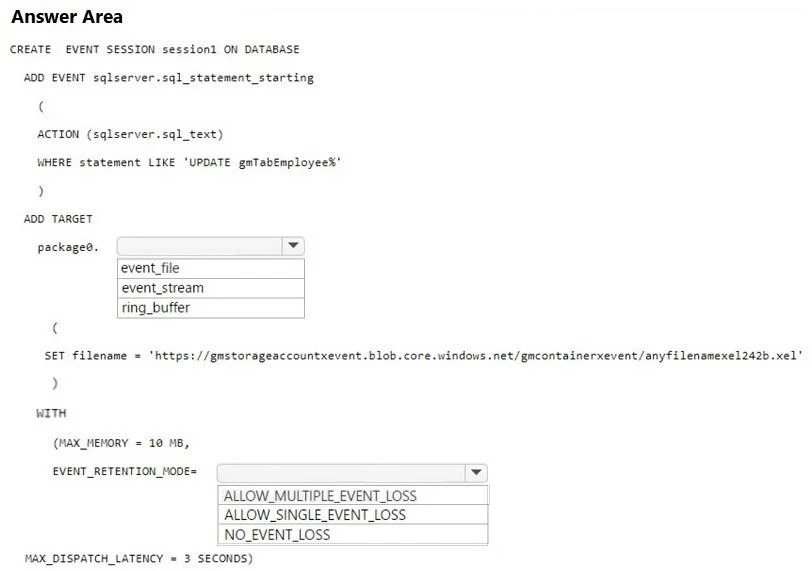
Answer Area
- package0.event_fileevent_fileevent_streamring_buffer
- EVENT_RETENTION_MODE=ALLOW_MULTIPLE_EVENT_LOSSALLOW_MULTIPLE_EVENT_LOSSALLOW_SINGLE_EVENT_LOSSNO_EVENT_LOSS
Explanation
This question tests knowledge of Extended Events in SQL Server, specifically how to configure an event session to capture raw data to Azure Blob Storage while minimizing performance overhead.
Approach. The correct Transact-SQL statement should use CREATE EVENT SESSION with an ADD TARGET specifying 'package0.event_file' as the target type, with the 'filename' parameter pointing to an Azure Blob Storage URL (e.g., 'https://<storage_account>.blob.core.windows.net/<container>/<filename>.xel'). To minimize performance impact, the WITH clause should include MAX_DISPATCH_LATENCY set appropriately and crucially TRACK_CAUSALITY = OFF and EVENT_RETENTION_MODE = ALLOW_SINGLE_EVENT_LOSS, which drops events rather than blocking the workload when the buffer is full, thereby minimizing performance impact. The event_file target captures raw event data in binary .xel format stored directly to Azure Storage, satisfying both requirements.
Concept tested. SQL Server Extended Events session configuration: using the 'package0.event_file' target with an Azure Blob Storage URL for raw data capture, and configuring EVENT_RETENTION_MODE = ALLOW_SINGLE_EVENT_LOSS (versus ALLOW_MULTIPLE_EVENT_LOSS or NO_EVENT_LOSS) to minimize performance impact by allowing event drops rather than blocking SQL Server workload threads.
Reference. https://docs.microsoft.com/en-us/sql/relational-databases/extended-events/use-the-ssms-xe-profiler?view=sql-server-ver16 and https://docs.microsoft.com/en-us/sql/relational-databases/extended-events/targets-for-extended-events-in-sql-server
Topics
Community Discussion
No community discussion yet for this question.