
DP-300 · Question #147
Hotspot Question You have an Azure Data Lake Storage Gen2 container. Data is ingested into the container, and then transformed by a data integration application. The data is NOT modified after that…
This hotspot question tests knowledge of Azure Blob Storage access tiers and lifecycle management policies to minimize costs while meeting specific availability and retention requirements.
Question
Exhibit
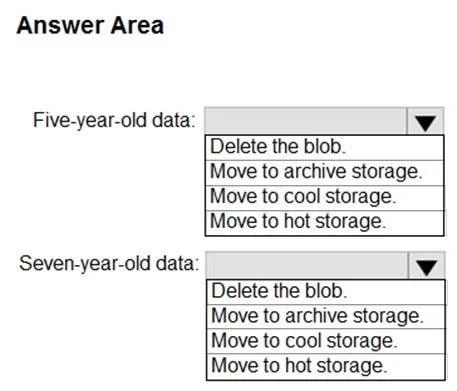
Answer Area
- Five-year-old data:Delete the blob.Move to archive storage.Move to cool storage.Move to hot storage.
- Seven-year-old data:Delete the blob.Move to archive storage.Move to cool storage.Move to hot storage.
Explanation
This hotspot question tests knowledge of Azure Blob Storage access tiers and lifecycle management policies to minimize costs while meeting specific availability and retention requirements.
Approach. New data (0-5 years) should use the Hot tier because it is accessed frequently and must be available as quickly as possible - Hot tier provides the lowest latency and highest throughput at a higher storage cost. Data older than five years but younger than seven years should use the Cool tier (or Cold tier) because it is accessed infrequently but must still be available within one second; Cool/Cold tier provides immediate access (sub-second retrieval) at a lower storage cost than Hot. Data older than seven years should be moved to the Archive tier because it is never accessed and must be stored at the lowest possible cost; Archive tier has the highest storage cost savings but requires rehydration time (hours) - however, since the data is never accessed after seven years, this latency is acceptable. A Lifecycle Management Policy should be configured to automatically transition blobs between tiers based on their last-modified date, moving data from Hot → Cool after 5 years and from Cool → Archive after 7 years.
Concept tested. Azure Blob Storage access tiers (Hot, Cool, Cold, Archive) and Lifecycle Management Policies - understanding which tier meets specific latency, access frequency, and cost requirements, and how to automate tier transitions using policy rules based on blob age.
Reference. https://learn.microsoft.com/en-us/azure/storage/blobs/access-tiers-overview and https://learn.microsoft.com/en-us/azure/storage/blobs/lifecycle-management-overview
Topics
Community Discussion
No community discussion yet for this question.