
DP-300 · Question #146
Hotspot Question You have an Azure Data Lake Storage Gen2 account named account1 that stores logs as shown in the following table. You do not expect that the logs will be accessed during the…
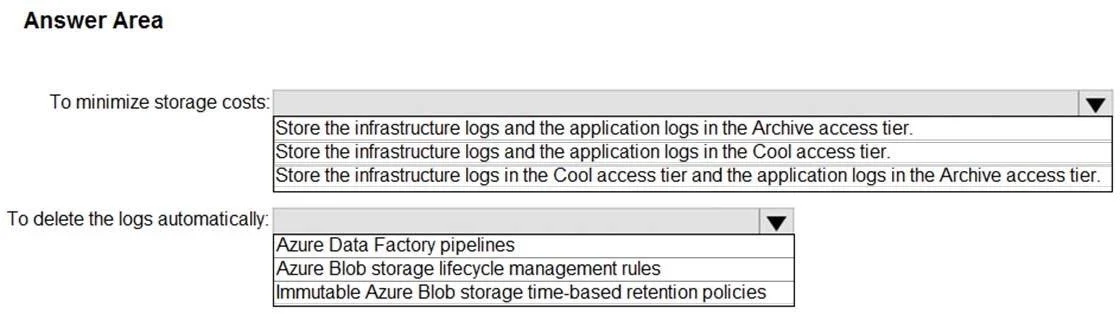
The correct answer is To minimize storage costs:: Store the infrastructure logs and the application logs in the Archive access tier.; To delete the logs automatically:: Azure Blob storage lifecycle management rules. This hotspot question tests knowledge of Azure Data Lake Storage Gen2 lifecycle management policies and optimal access tiers for logs that won't be accessed during their retention periods.
Question
Exhibit
Answer Area
- To minimize storage costs:Store the infrastructure logs and the application logs in the Archive access tier.Store the infrastructure logs and the application logs in the Archive access tier.Store the infrastructure logs and the application logs in the Cool access tier.Store the infrastructure logs in the Cool access tier and the application logs in the Archive access tier.
- To delete the logs automatically:Azure Blob storage lifecycle management rulesAzure Data Factory pipelinesAzure Blob storage lifecycle management rulesImmutable Azure Blob storage time-based retention policies
Explanation
This hotspot question tests knowledge of Azure Data Lake Storage Gen2 lifecycle management policies and optimal access tiers for logs that won't be accessed during their retention periods.
Approach. For logs stored less than 60 days (e.g., 30 days), the Cool access tier is most cost-effective since Cool tier is designed for infrequently accessed data stored for at least 30 days. For logs stored 60 days or more (e.g., 90 or 365 days), the Archive access tier minimizes storage costs since Archive is the cheapest tier for data that won't be accessed and can tolerate retrieval latency. To automatically delete logs at the end of each retention period, you should use Azure Blob Storage Lifecycle Management policies, which allow you to define rules that transition blobs between tiers and delete them automatically based on age (last modified date), eliminating the need for manual intervention.
Concept tested. Azure Data Lake Storage Gen2 access tiers (Hot, Cool, Archive) and Lifecycle Management policies - specifically knowing when to use Cool vs. Archive tiers based on retention duration, and using lifecycle management rules to automate both tier transitions and automatic deletion of blobs at the end of their retention period.
Reference. https://learn.microsoft.com/en-us/azure/storage/blobs/lifecycle-management-overview
Topics
Community Discussion
No community discussion yet for this question.