
DP-100 · Question #392
Drag and Drop Question You provision an Azure Machine Learning workspace in a new Azure subscription. You need to attach Azure Databricks as a compute resource from the Azure Machine Learning…
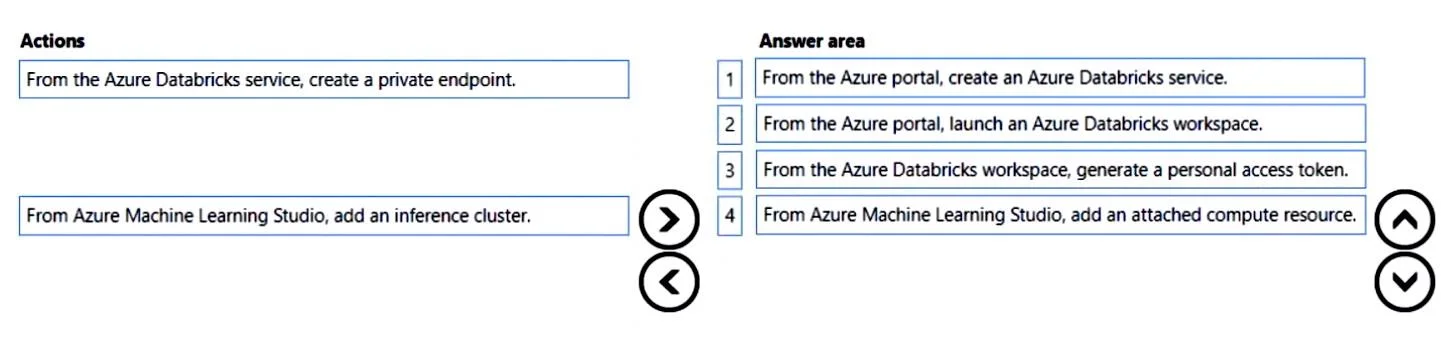
The correct answer is From the Azure portal, create an Azure Databricks service.; From the Azure portal, launch an Azure Databricks workspace.; From the Azure Databricks workspace, generate a personal access token.; From Azure Machine Learning Studio, add an attached compute resource. To attach Azure Databricks as a compute resource to an Azure Machine Learning workspace, one must first create the Databricks service, launch its workspace, generate a personal access token for authentication, and then attach it within Azure Machine Learning Studio.
Question
Exhibit
Answer Area
Drag items
Correct arrangement
- From the Azure portal, create an Azure Databricks service.
- From the Azure portal, launch an Azure Databricks workspace.
- From the Azure Databricks workspace, generate a personal access token.
- From Azure Machine Learning Studio, add an attached compute resource.
Explanation
To attach Azure Databricks as a compute resource to an Azure Machine Learning workspace, one must first create the Databricks service, launch its workspace, generate a personal access token for authentication, and then attach it within Azure Machine Learning Studio.
Approach. The task requires attaching an Azure Databricks workspace to an Azure Machine Learning workspace as a compute resource. The correct sequence of four actions is as follows:
- From the Azure portal, create an Azure Databricks service. This is the foundational step to provision the Azure Databricks workspace itself within your Azure subscription.
- From the Azure portal, launch an Azure Databricks workspace. After creation, the Databricks workspace needs to be accessed and launched to perform subsequent configurations and retrieve necessary credentials.
- From the Azure Databricks workspace, generate a personal access token. Azure Machine Learning requires authentication to programmatically interact with Azure Databricks. A personal access token (PAT) is a common and recommended method for granting this access.
- From Azure Machine Learning Studio, add an attached compute resource. With the Databricks workspace provisioned and a PAT generated, the final step is to navigate to the Azure Machine Learning Studio, select 'Compute', and then 'Attached compute' to link the Databricks workspace using its details and the generated PAT.
Therefore, the user should drag these four actions in this specific order from the 'Actions' list to the 'Answer area'.
Common mistakes.
- common_mistake. A common mistake would be to include 'From the Azure Databricks service, create a private endpoint.' This action relates to network isolation and security, which is an advanced configuration for Databricks, not a mandatory or initial step for simply attaching it as a compute resource to Azure ML. Another incorrect choice would be 'From Azure Machine Learning Studio, add an inference cluster.' While an inference cluster is a type of compute target within Azure ML, it refers to a specific type of managed compute for model deployment, not the process of attaching an external Azure Databricks workspace as a generic compute resource. Misordering the steps, such as attempting to generate a personal access token before creating or launching the Databricks workspace, would also be incorrect as dependencies between actions must be respected.
Concept tested. Integrating Azure Databricks with Azure Machine Learning as a compute resource, including the necessary provisioning, authentication, and attachment steps.
Topics
Community Discussion
No community discussion yet for this question.