
DP-100 · Question #252
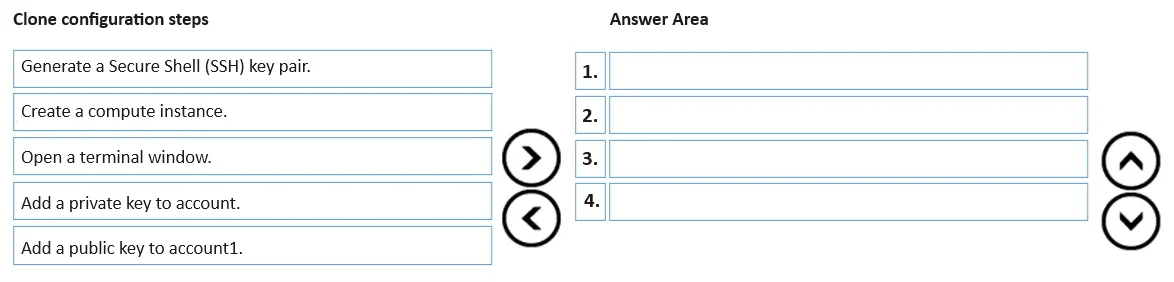
Drag and Drop Question You have an Azure Machine Learning workspace named WS1 and a GitHub account named account1 that hosts a private repository named repo1. You need to clone repo1 to make it…
The correct answer is Create a compute instance.; Open a terminal window.; Generate a Secure Shell (SSH) key pair.; Add a public key to account1. The question assesses the candidate's ability to correctly sequence the steps for configuring SSH key-based authentication to clone a private GitHub repository into an Azure Machine Learning compute instance.
Question
Exhibit
Answer Area
Drag items
Correct arrangement
- Create a compute instance.
- Open a terminal window.
- Generate a Secure Shell (SSH) key pair.
- Add a public key to account1.
Explanation
The question assesses the candidate's ability to correctly sequence the steps for configuring SSH key-based authentication to clone a private GitHub repository into an Azure Machine Learning compute instance.
Approach. To correctly answer, the following four steps must be dragged into the 'Answer Area' in the specified sequence:
- 'Create a compute instance.'
- 'Open a terminal window.'
- 'Generate a Secure Shell (SSH) key pair.'
- 'Add a public key to account1.'
- 'Create a compute instance.' is the necessary first step because an Azure Machine Learning compute instance provides the computational environment where you can execute commands, including Git operations and SSH key generation. You need a machine to perform the actions.
- 'Open a terminal window.' is the logical next step after creating the compute instance. A terminal provides command-line access to the compute instance, allowing you to run commands like 'ssh-keygen' and 'git clone'.
- 'Generate a Secure Shell (SSH) key pair.' is crucial for secure and performant access to a private GitHub repository. This command creates both the public and private keys locally on the compute instance. This step must precede any action involving the keys themselves.
- 'Add a public key to account1.' is the final configuration step among the choices. The public key, generated in the previous step, must be uploaded to the GitHub account (
account1) that hosts the private repository. This allows GitHub to authenticate the compute instance when it attempts to clone the repository using the corresponding private key, without requiring password prompts and optimizing performance.
Common mistakes.
- common_mistake. The most common mistake would be including 'Add a private key to account.' in the sequence or misordering the selected steps.
- 'Add a private key to account.' is an incorrect step in this context. The private key must remain securely on the compute instance and should never be added to a public service like GitHub. Only the public key is shared with GitHub for authentication. Attempting to 'add' a private key to an account would be a significant security flaw.
- Incorrect sequencing of the chosen steps would also be wrong. For instance, trying to generate keys or open a terminal before creating a compute instance is illogical, as there would be no environment to perform these actions. Similarly, attempting to add a public key before it has been generated is not possible.
Concept tested. The core concept being tested is the configuration of secure and performant access to private Git repositories (specifically GitHub) from an Azure Machine Learning compute instance using SSH key authentication. This includes understanding the prerequisites for performing operations within an Azure ML workspace (compute instance, terminal access) and the fundamental principles of SSH key pair generation and deployment (public key for the service, private key kept local to the client).
Topics
Community Discussion
No community discussion yet for this question.