
DP-100 · Question #329
Drag and Drop Question You manage an Azure Machine Learning workspace named workspace1. You plan to create a registry named registry01 with the help of the following registry.yml (line numbers are…
The correct answer is Install Azure Machine Learning Python SDK v2.; Connect to the workspace.; Use begin_create() to create a registry. To create an Azure Machine Learning registry using Python SDK v2, the essential steps are to install the SDK, connect to the workspace, and then initiate the registry creation using the appropriate method.
Question
Exhibit
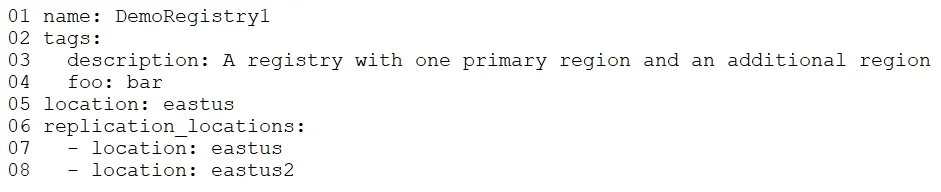
Answer Area
Drag items
Correct arrangement
- Install Azure Machine Learning Python SDK v2.
- Connect to the workspace.
- Use begin_create() to create a registry.
Explanation
To create an Azure Machine Learning registry using Python SDK v2, the essential steps are to install the SDK, connect to the workspace, and then initiate the registry creation using the appropriate method.
Approach. The correct sequence of actions to create an Azure Machine Learning registry using the Python SDK v2 in a notebook environment is:
- Install Azure Machine Learning Python SDK v2.: Before any interaction with Azure Machine Learning resources via Python, the necessary SDK must be installed in the environment (e.g., using
pip install azure-ai-ml). This is always the foundational first step for SDK usage. - Connect to the workspace.: After the SDK is installed, the next step is to establish a connection to the specific Azure Machine Learning workspace. This usually involves instantiating an
MLClientobject, which authenticates and provides the context for subsequent operations within that workspace. - Use begin_create() to create a registry.: Once the SDK is installed and connected to the workspace, the actual creation of the registry is performed. The
begin_create()method (or similarcreate()method) is the standard asynchronous or synchronous call used in Azure ML Python SDK v2 to provision new resources like registries, jobs, or models. While creating and loading theregistry.ymlfile into a Python object is a necessary precursor to callingbegin_create(), the question asks for the three primary actions. Thebegin_create()call is the ultimate action that submits the registry definition to Azure for creation.
Common mistakes.
- common_mistake. Selecting 'Load registry01.yml with the get('registry01') method.' is incorrect. The
get()method in the Azure ML SDK is used to retrieve an existing resource by its name or ID, not to load a local YAML file definition for creation. To load a local YAML file for creating a new registry, you would typically use a function likeml_client.load_registry(source='registry.yml'). Additionally, omitting 'Install Azure Machine Learning Python SDK v2.' or 'Connect to the workspace.' would prevent any SDK operations from succeeding. While 'Create and load registry01.yml.' is a necessary logical step to prepare the registry definition object, the exam question asks for only three primary actions. In this context, 'Use begin_create() to create a registry.' is considered the core execution step for creating the resource, implying that the necessary definition preparation is a prerequisite to that action rather than a distinct primary action in the limited sequence.
Concept tested. Azure Machine Learning registry creation, sequential steps for setting up an Azure Machine Learning Python SDK v2 environment, and understanding the core methods for resource provisioning.
Topics
Community Discussion
No community discussion yet for this question.