
DP-100 · Question #330
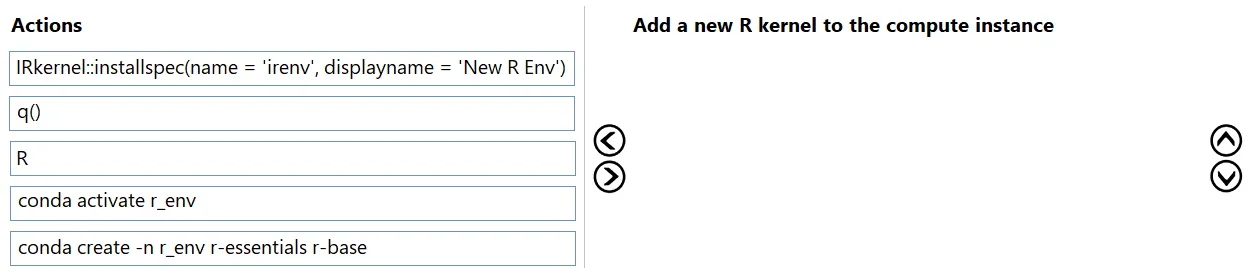
Drag and Drop Question You have an Azure Machine Learning workspace. You plan to use the terminal to configure a compute instance to run a notebook. You need to add a new R kernel to the compute…
The correct answer is conda create -n r_env r-essentials r-base; conda activate r_env; R; IRkernel::installspec(name = 'irenv', displayname = "New R Env"). The task involves creating a new Conda environment for R, activating it, starting an R session, installing the IRkernel specification to register it as a Jupyter kernel, and finally quitting the R session.
Question
Exhibit
Answer Area
Drag items
Correct arrangement
- conda create -n r_env r-essentials r-base
- conda activate r_env
- R
- IRkernel::installspec(name = 'irenv', displayname = "New R Env")
Explanation
The task involves creating a new Conda environment for R, activating it, starting an R session, installing the IRkernel specification to register it as a Jupyter kernel, and finally quitting the R session.
Approach. The correct interaction is to drag and drop the actions into the answer area in the following order:
- conda create -n r_env r-essentials r-base: This command is the first step because it creates a new Conda environment named 'r_env' and installs the essential R packages (
r-essentialsandr-base) within it. You cannot activate or use an environment before it's created. - conda activate r_env: After the environment is created, it needs to be activated. This command changes the current shell environment to use the packages and binaries from the 'r_env' environment, ensuring that subsequent R commands operate within this isolated environment.
- R: Once the R environment is active, this command starts an interactive R session in the terminal. R-specific commands can only be executed within an active R session.
- IRkernel::installspec(name = 'irenv', displayname = 'New R Env'): This command is an R function. It must be executed inside an R session. It registers the currently active R environment (which includes the
IRkernelpackage, usually provided byr-essentials) as a Jupyter kernel, making it available for use in notebooks with the specified name ('irenv') and display name ('New R Env'). - q(): This R function quits the interactive R session. It's the final cleanup step after the kernel has been successfully installed.
Common mistakes.
- common_mistake. Common mistakes include attempting to activate a Conda environment before it's created, trying to run R commands (like
IRkernel::installspecorq()) before starting an R session using theRcommand, or placingIRkernel::installspecbefore theRcommand. For example, runningRbeforeconda activate r_envwould launch the base R interpreter, not the one in the newly created environment. Similarly, trying to install the kernel spec outside of an R session would result in a 'command not found' error. Placingq()before theIRkernel::installspecwould exit R before the kernel could be registered.
Concept tested. The underlying technical concept being tested is the process of managing Conda environments for data science workflows, specifically creating and activating custom environments for different language kernels (like R) and then registering those environments as Jupyter kernels within an Azure Machine Learning compute instance. This involves understanding the sequence of operations for environment setup, language interpreter initiation, and kernel installation.
Topics
Community Discussion
No community discussion yet for this question.