
D-UN-OE-23 · Question #83
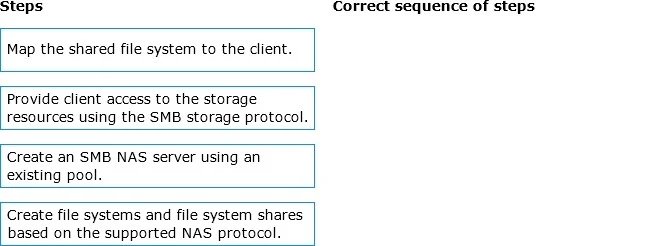
Drag and Drop Question What is the correct sequence of steps to provision storage for SMB NAS clients? Answer:
The correct answer is Create an SMB NAS server using an existing pool.; Create file systems and file system shares based on the supported NAS protocol.; Provide client access to the storage resources using the SMB storage protocol.; Map the shared file system to the client. Provisioning Storage for SMB NAS Clients - Correct Sequence Explained The order follows a strict infrastructure dependency chain: you must build the foundation before you can use it. --- Step 1: Create an SMB NAS server using an existing pool Why first: Everything else depends…
Question
Drag and Drop Question What is the correct sequence of steps to provision storage for SMB NAS clients? Answer:
Exhibit
Answer Area
Drag items
Correct arrangement
- Create an SMB NAS server using an existing pool.
- Create file systems and file system shares based on the supported NAS protocol.
- Provide client access to the storage resources using the SMB storage protocol.
- Map the shared file system to the client.
Explanation
Provisioning Storage for SMB NAS Clients - Correct Sequence Explained
The order follows a strict infrastructure dependency chain: you must build the foundation before you can use it.
Step 1: Create an SMB NAS server using an existing pool
Why first: Everything else depends on this. A NAS server is the logical container that holds protocol configurations, network interfaces, and authentication settings. Without it, there's no entity to attach file systems to or serve SMB traffic. The "existing pool" is your pre-provisioned block storage - it must already exist, but the NAS server is what makes it accessible as file-level storage.
Common mistake: Thinking you can create file systems before the NAS server. You can't - file systems must be associated with a NAS server at creation time.
Step 2: Create file systems and file system shares based on the supported NAS protocol
Why second: Now that the NAS server exists, you create file systems on it (carved from the pool) and then expose them as SMB shares. The share is the specific export point that SMB clients will eventually connect to. No share = nothing to map.
Common mistake: Conflating the file system and the share. The file system is the storage container; the share is the network-accessible export of that container. Both must be created before access control is configured.
Step 3: Provide client access to the storage resources using the SMB storage protocol
Why third: This step configures who can access what - setting permissions, authentication (e.g., Active Directory integration), and network access policies on the share. The share must exist (Step 2) before you can control access to it.
Common mistake: Skipping or conflating this with Step 4. Access provisioning is a server-side configuration; mapping is a client-side action. You must open the door before someone can walk through it.
Step 4: Map the shared file system to the client
Why last: This is the client-side action (e.g., net use Z: \\server\share on Windows). Only now - after the NAS server is up, the share exists, and access is granted - will the mapping succeed. Attempting to map before any prior step will result in connection or permission errors.
Common mistake: Trying to map the drive before access is configured (Step 3), which results in "access denied" even if the share is reachable on the network.
Mental Model
Think of it as building a store:
- Build the building (NAS server)
- Stock the shelves and open departments (file systems + shares)
- Give customers a key/membership (access provisioning)
- Customer walks in (client maps the drive)
Each step is a prerequisite for the next - no shortcuts.
Topics
Community Discussion
No community discussion yet for this question.