
D-UN-OE-23 · Question #84
Drag and Drop Question A storage engineer must restore a LUN snapshot using a previous copy. What is the correct sequence of steps? Answer:
The correct answer is Quiesce host I/O.; Disconnect host from LUN; Detach hosts from LUN Snapshots; Select snapshot Restore.; System creates snap of current LUN data state; LUN is restored to snapshot data state. LUN Snapshot Restore: Step-by-Step Explanation The Core Logic The sequence follows a prepare → isolate → restore → verify pattern. Every step protects data integrity - either preventing corruption before the restore or ensuring a safe rollback path during it. --- Step-by-Step…
Question
Drag and Drop Question A storage engineer must restore a LUN snapshot using a previous copy. What is the correct sequence of steps? Answer:
Exhibit
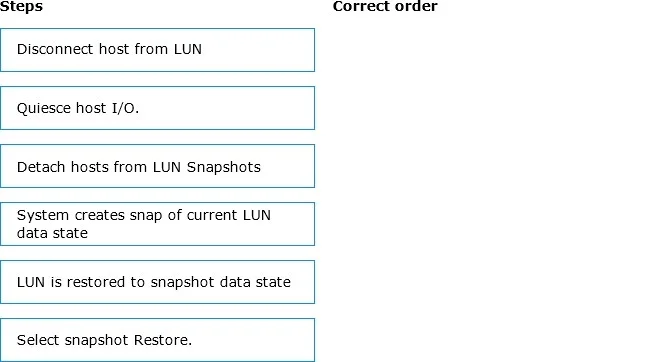
Answer Area
Drag items
Correct arrangement
- Quiesce host I/O.
- Disconnect host from LUN
- Detach hosts from LUN Snapshots
- Select snapshot Restore.
- System creates snap of current LUN data state
- LUN is restored to snapshot data state
Explanation
LUN Snapshot Restore: Step-by-Step Explanation
The Core Logic
The sequence follows a prepare → isolate → restore → verify pattern. Every step protects data integrity - either preventing corruption before the restore or ensuring a safe rollback path during it.
Step-by-Step Breakdown
1. Quiesce Host I/O
Why first: You must stop all in-flight write operations before touching anything. If the host is still writing to the LUN when you disconnect it, you risk file system corruption or split writes. Quiescing ensures the LUN is in a consistent, clean state.
Common mistake: Skipping this and going straight to disconnect. The host OS may have pending writes buffered that haven't hit the disk yet.
2. Disconnect Host from LUN
Why second: Once I/O is quiesced (not just paused), you sever the host's access path to the LUN entirely. This prevents any accidental reconnection or new I/O from interfering with the restore process.
Common mistake: Confusing "quiesce" with "disconnect" - they are separate steps. Quiesce stops I/O at the application/OS level; disconnect removes the storage path.
3. Detach Hosts from LUN Snapshots
Why third: Snapshots that are actively mounted or presented to a host are "in use" and cannot be used as a restore source. You must detach them first to free the snapshot for the restore operation.
Common mistake: Trying to restore from a snapshot that's still mounted. Storage systems will reject this or produce undefined behavior.
4. Select Snapshot Restore
Why fourth: Only now - with I/O stopped, the LUN disconnected, and snapshots detached - do you initiate the restore. This is the operator action that triggers the system-side restore workflow.
Common mistake: Treating this as step 1. The GUI/CLI may allow you to click Restore earlier, but the operation will fail or produce errors if prerequisites aren't met.
5. System Creates Snap of Current LUN Data State
Why fifth (automatic): This is a system-generated safety snapshot - it happens automatically after you trigger the restore but before any data is overwritten. It preserves the current (pre-restore) LUN state so you can roll back if the restoration produces unexpected results.
Common mistake: Thinking this is a manual step, or thinking the system skips it. Most enterprise storage platforms (Dell EMC, NetApp, Pure Storage) do this automatically as a safeguard. It's easy to overlook on exams.
6. LUN Is Restored to Snapshot Data State
Why last: The actual data restoration only happens after the safety snapshot is captured. The LUN's data is now overwritten with the contents of the selected snapshot.
Common mistake: Expecting this to be instant. Depending on the storage platform and snapshot type (pointer-based vs. full copy), this may happen immediately (metadata redirect) or take time (physical data copy).
Summary Table
| # | Step | Category |
|---|---|---|
| 1 | Quiesce host I/O | Preparation |
| 2 | Disconnect host from LUN | Isolation |
| 3 | Detach hosts from LUN Snapshots | Isolation |
| 4 | Select snapshot Restore | Operator action |
| 5 | System creates snap of current state | Automatic safety net |
| 6 | LUN restored to snapshot data state | Execution |
Key insight: Steps 1–3 protect against data corruption. Step 5 protects against a bad restore. The system never overwrites existing data without first creating a recovery path.
Topics
Community Discussion
No community discussion yet for this question.