
D-UN-OE-23 · Question #85
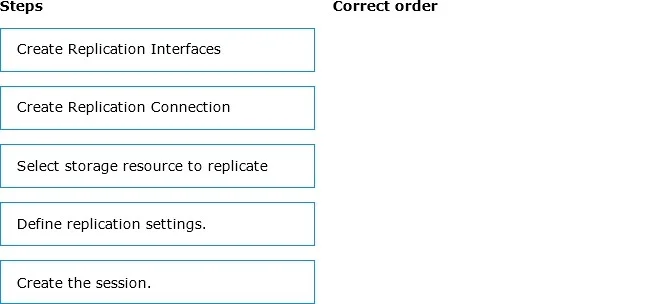
Drag and Drop Question What is the correct order of steps for the Synchronous Replication Creation Process? Answer:
The correct answer is Create Replication Interfaces; Create Replication Connection; Select storage resource to replicate; Define replication settings.; Create the session. Synchronous Replication Creation Process - Explained Core Logic of the Order The sequence follows a bottom-up infrastructure model: build the transport layer first, then configure what travels over it, then activate. You cannot configure what you haven't built. --- Step-by-Step…
Question
Drag and Drop Question What is the correct order of steps for the Synchronous Replication Creation Process? Answer:
Exhibit
Answer Area
Drag items
Correct arrangement
- Create Replication Interfaces
- Create Replication Connection
- Select storage resource to replicate
- Define replication settings.
- Create the session.
Explanation
Synchronous Replication Creation Process - Explained
Core Logic of the Order
The sequence follows a bottom-up infrastructure model: build the transport layer first, then configure what travels over it, then activate. You cannot configure what you haven't built.
Step-by-Step Breakdown
1. Create Replication Interfaces
Why first: Replication interfaces are the dedicated network endpoints (ports) on each storage system that will carry replication traffic. Nothing else can be configured until the system knows through what data will travel. This is pure infrastructure - no connection, resource, or session can exist without endpoints on both sides.
Common mistake: Skipping this on the assumption existing management ports will work. Replication typically requires dedicated interfaces to isolate replication traffic from host I/O traffic.
2. Create Replication Connection
Why second: A connection links the two storage systems (source and destination) using the interfaces created in step 1. It establishes and validates the communication path between the two arrays. Without a verified connection, you cannot associate any storage resource with a remote target.
Common mistake: Trying to select a storage resource before confirming the remote system is reachable. The connection must exist first so the system knows where to replicate to.
3. Select Storage Resource to Replicate
Why third: Now that the transport path exists (interfaces + connection), you identify what will be replicated - a LUN, volume, consistency group, or file system. The system needs the infrastructure in place before it can associate a resource with a remote destination.
Common mistake: Treating this as the first step. It feels intuitive to "pick what to replicate" first, but the system cannot validate or target a remote resource without an active connection.
4. Define Replication Settings
Why fourth: With the resource selected, you now configure how replication behaves - synchronous mode confirmation, RPO (Recovery Point Objective), bandwidth throttling, or schedule (if applicable). These settings are properties of the resource-to-session relationship, so the resource must be identified first.
Common mistake: Confusing this with the connection step. Connection settings define system-to-system parameters; replication settings define per-resource behavior.
5. Create the Session
Why last: The session is the active replication relationship that ties everything together - interfaces, connection, resource, and settings. It is the instantiation of all prior configuration. Creating it triggers the initial sync and begins ongoing replication.
Common mistake: Thinking the session is created mid-process. The session is always the final activation step - it cannot exist without all preceding components being defined.
Summary Pattern
| Phase | Steps | Concept |
|---|---|---|
| Infrastructure | 1 → 2 | Build the network path |
| Resource targeting | 3 | Identify what to replicate |
| Configuration | 4 | Define how to replicate it |
| Activation | 5 | Start replication |
The order enforces a dependency chain: each step is a prerequisite for the next. You cannot skip ahead because the system has nothing to reference.
Topics
Community Discussion
No community discussion yet for this question.