
D-PST-DY-23 · Question #57
Drag and Drop Question Place the steps in the correct order to configure vCenter server to use PowerStore to support virtual volumes. Answer:
The correct answer is Add PowerStore cluster as VASA provider.; Create vVol DataStore.; Create VM storage policies.; Provision VMs. Configuring vCenter with PowerStore for Virtual Volumes (vVols) The Core Logic This sequence follows a strict dependency chain: you cannot use a component until the component it depends on is configured. Each step unlocks the next. --- Step-by-Step Breakdown 1. Add PowerStore…
Question
Exhibit
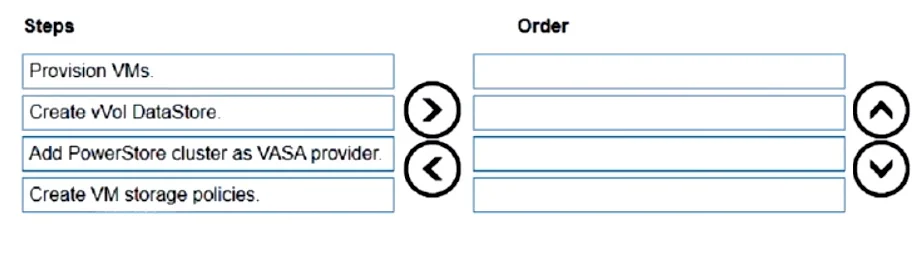
Answer Area
Drag items
Correct arrangement
- Add PowerStore cluster as VASA provider.
- Create vVol DataStore.
- Create VM storage policies.
- Provision VMs
Explanation
Configuring vCenter with PowerStore for Virtual Volumes (vVols)
The Core Logic
This sequence follows a strict dependency chain: you cannot use a component until the component it depends on is configured. Each step unlocks the next.
Step-by-Step Breakdown
1. Add PowerStore cluster as VASA provider
VASA (vSphere APIs for Storage Awareness) is the communication protocol between the storage array and vCenter. Registering PowerStore as a VASA provider is the foundational step - it tells vCenter that PowerStore exists, and allows vCenter to discover the array's capabilities, storage containers, and Protocol Endpoints.
Why first: Without VASA registration, vCenter is completely blind to the PowerStore array. Nothing else is possible.
2. Create vVol Datastore
Once the VASA provider is registered, vCenter can discover PowerStore's storage containers. You then create a vVol datastore backed by those containers. This datastore is the logical construct vSphere uses to manage vVol storage.
Why second: The vVol datastore cannot exist without the VASA provider already advertising the storage containers. This step also requires the Protocol Endpoints to be accessible.
3. Create VM Storage Policies
VM Storage Policies (via SPBM - Storage Policy-Based Management) define performance, availability, and replication requirements. These policies leverage the capability profiles advertised by the VASA provider.
Why third: Storage policies must reference real, discovered storage capabilities. Those capabilities are only visible after the VASA provider is registered and the datastore exists to associate the policies with.
4. Provision VMs
With the datastore available and storage policies defined, you can now provision VMs. During provisioning, you assign a storage policy, and vCenter/PowerStore places the VM's vVols on storage that satisfies that policy.
Why last: This is the end goal - everything prior is infrastructure setup.
Common Mistakes
| Mistake | Why it fails |
|---|---|
| Creating the vVol datastore before VASA registration | vCenter has no storage containers to point the datastore at |
| Provisioning VMs before creating storage policies | You lose the core benefit of vVols: granular, policy-driven storage management |
| Skipping storage policies entirely | VMs may still provision, but without SPBM you lose automated placement and compliance tracking - a common misconception that "policies are optional" |
Topics
Community Discussion
No community discussion yet for this question.