
D-PST-DY-23 · Question #56
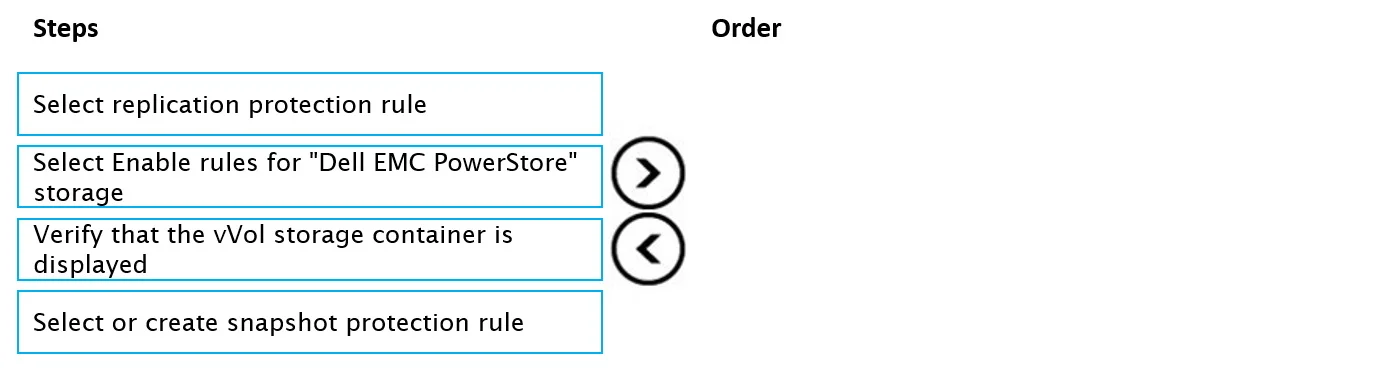
Drag and Drop Question Place the steps in order for configuring source and destination vCenters when setting up a vVol replication with SRM. Answer:
The correct answer is Select Enable rules for "Dell EMC PowerStore" storage; Select or create snapshot protection rule; Select replication protection rule; Verify that the vVol storage container is displayed. vVol Replication with SRM: Step-by-Step Configuration Order Context: This workflow configures source and destination vCenters in VMware Site Recovery Manager (SRM) to use Dell EMC PowerStore vVol replication. The steps follow a logical build-up: enable → define local protection…
Question
Exhibit
Answer Area
Drag items
Correct arrangement
- Select Enable rules for "Dell EMC PowerStore" storage
- Select or create snapshot protection rule
- Select replication protection rule
- Verify that the vVol storage container is displayed
Explanation
vVol Replication with SRM: Step-by-Step Configuration Order
Context: This workflow configures source and destination vCenters in VMware Site Recovery Manager (SRM) to use Dell EMC PowerStore vVol replication. The steps follow a logical build-up: enable → define local protection → define remote protection → verify.
Step 1: Select Enable rules for "Dell EMC PowerStore" storage
Why first: This is the prerequisite activation step. SRM integrates with storage arrays via Storage Replication Adapters (SRAs). Before any protection rules can be defined, you must explicitly enable the rule set for the specific storage vendor (PowerStore). Without this, SRM has no awareness of the array's snapshot or replication capabilities, making the subsequent steps impossible.
Common mistake: Skipping directly to protection rules, then finding no storage policies are available. The array must be "activated" within SRM first.
Step 2: Select or create snapshot protection rule
Why second: Snapshot rules define how local snapshots are taken on the PowerStore array (frequency, retention, consistency groups). In vVol replication, snapshots are the underlying mechanism that enables replication - the replication protection rule depends on a snapshot rule existing first. You must define local data protection before extending it to a remote site.
Common mistake: Assuming replication rules are independent of snapshot rules. In PowerStore-backed vVol environments, replication is snapshot-based, so the dependency is strict.
Step 3: Select replication protection rule
Why third: The replication protection rule governs how snapshot data is replicated to the secondary site (RPO, schedule, target). It references and builds upon the snapshot rule from Step 2. Only after the local snapshot policy is defined can you configure the remote replication policy that SRM will use to orchestrate failover.
Common mistake: Placing replication before snapshots. Replication in this context is an extension of the snapshot mechanism, not a standalone configuration.
Step 4: Verify that the vVol storage container is displayed
Why last: This is a confirmation/validation step, not a configuration step. After enabling the storage and configuring both snapshot and replication rules, you verify that the vVol storage container (datastore) is visible and correctly registered in vCenter. A successful display confirms the entire configuration pipeline completed without errors.
Common mistake: Treating this as an early step (like a pre-check). It only makes sense as a final verification - you cannot meaningfully verify a container that hasn't been configured yet.
Summary Table
| # | Step | Role |
|---|---|---|
| 1 | Enable rules for PowerStore | Activate storage array in SRM |
| 2 | Snapshot protection rule | Define local data capture policy |
| 3 | Replication protection rule | Define remote replication policy |
| 4 | Verify vVol container displayed | Confirm successful configuration |
The key insight: enable → local policy → remote policy → verify is a universal pattern in SRM/vVol setup. Each step unlocks the next.
Topics
Community Discussion
No community discussion yet for this question.