
C_TSCM42_65 · Question #106
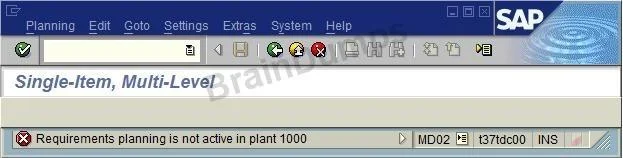
When testing requirements planning in plant 1000, you receive the error message displayed below. Large numbers of materials are already available in plant 1000. As a first step in solving the…
Sign in or unlock C_TSCM42_65 to reveal the answer and full explanation for question #106. The question stem and answer options stay visible for context.
Question
When testing requirements planning in plant 1000, you receive the error message displayed below. Large numbers of materials are already available in plant 1000. As a first step in solving the problem, you activate requirements planning in the Customizing for plant 1000. What further tasks do you perform before you can use requirements planning in plant 1000 in SAP ECC?
Exhibit
Options
- ASet up the planning file in Customizing and specify the plant parameters for plant 1000 in Customizing.
- BSet up the planning files in Customizing and specify the plant parameters for plant 1000 in Customizing of
- CSet up the planning file in Customizing and specify the plant parameters for plant 1000 in the MRP views
- DActivate requirements planning in Customizing for MRP areas in plant 1000 and specify the plant
Unlock C_TSCM42_65 to see the answer
You've previewed enough free C_TSCM42_65 questions. Unlock C_TSCM42_65 for full answers, explanations, the timed quiz mode, progress tracking, and the master PDF. Question stem and options stay visible so you can still see what's on the exam.