
AZ-800 · Question #187
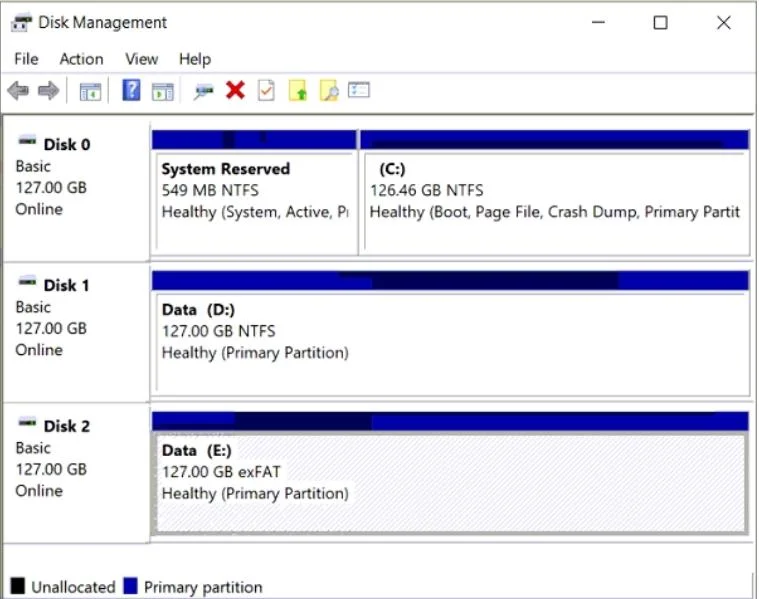
You have a server named Server1 that runs Windows Server. The disks on Server1 are configured as shown in the following exhibit. You need to convert volume E to ReFS. The solution must meet the…
The correct answer is A. Back up the data on volume E. There is no in-place conversion path from NTFS (or any existing file system) to ReFS. Unlike NTFS which supports 'convert.exe' from FAT, ReFS can only be applied to a freshly formatted volume. To retain the data, the only viable path is: (1) back up the data, (2) format the…
Question
You have a server named Server1 that runs Windows Server. The disks on Server1 are configured as shown in the following exhibit. You need to convert volume E to ReFS. The solution must meet the following requirements:
- The data on volume E needs to be retained.
- Minimize administrative effort.
What should you do first?
Exhibit
Options
- ABack up the data on volume E.
- BTake Disk 2 offline.
- CConvert Disk 2 to a dynamic disk.
- DRun convert.exe.
How the community answered
(20 responses)- A80% (16)
- B5% (1)
- C5% (1)
- D10% (2)
Explanation
There is no in-place conversion path from NTFS (or any existing file system) to ReFS. Unlike NTFS which supports 'convert.exe' from FAT, ReFS can only be applied to a freshly formatted volume. To retain the data, the only viable path is: (1) back up the data, (2) format the volume as ReFS, (3) restore the data. Therefore, backing up the data on volume E must happen first. Taking Disk 2 offline or converting to dynamic disk does not enable ReFS conversion. Running convert.exe does not support ReFS as a target file system.
Topics
Community Discussion
No community discussion yet for this question.