
AZ-800 · Question #194
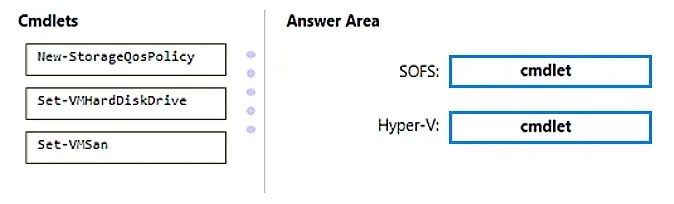
Drag and Drop Question You have a disaggregated cluster deployment. The deployment contains a scale-out file server (SOFS) cluster that runs Windows Server and a compute cluster that has the Hyper-V…
The correct answer is New-StorageQosPolicy; Set-VMHardDiskDrive. To implement Storage QoS for a disaggregated cluster, New-StorageQosPolicy is used on the SOFS cluster to define policies, and Set-VMHardDiskDrive is used on the Hyper-V cluster to apply those policies to virtual disks.
Question
Exhibit
Answer Area
Drag items
Correct arrangement
- New-StorageQosPolicy
- Set-VMHardDiskDrive
Explanation
To implement Storage QoS for a disaggregated cluster, New-StorageQosPolicy is used on the SOFS cluster to define policies, and Set-VMHardDiskDrive is used on the Hyper-V cluster to apply those policies to virtual disks.
Approach. The scenario requires implementing Storage Quality of Service (QoS) to control bandwidth usage between a Scale-Out File Server (SOFS) cluster and a Hyper-V compute cluster. Storage QoS in this context involves defining policies on the storage provider and then applying those policies to the virtual disks consumed by virtual machines.
- SOFS Cluster -
New-StorageQosPolicy: The SOFS cluster acts as the storage provider. Storage QoS policies, which define minimum and maximum IOPS or bandwidth limits for virtual disks, are created on the storage provider. Therefore, theNew-StorageQosPolicycmdlet, which is used to define such policies, should be run on the SOFS cluster. - Hyper-V Cluster -
Set-VMHardDiskDrive: The Hyper-V cluster hosts the virtual machines that consume storage from the SOFS. To apply the defined Storage QoS policies to specific virtual hard disks (VHDX files) or to set individual QoS limits, theSet-VMHardDiskDrivecmdlet is used. This cmdlet allows you to link a virtual hard disk to a pre-defined Storage QoS policy or directly configure its minimum/maximum IOPS/bandwidth. This cmdlet is run on the Hyper-V host (or cluster) where the virtual machines and their virtual hard disks reside.
Common mistakes.
- common_mistake. 1. Using
Set-VMSan: TheSet-VMSancmdlet is used to configure Virtual Machine SAN (VMSAN) settings, which are typically associated with Fibre Channel storage for Hyper-V. The scenario specifies a Scale-Out File Server (SOFS) cluster, which typically provides storage over SMB 3.0, not Fibre Channel. Therefore,Set-VMSanis irrelevant to this deployment type.
- Swapping
New-StorageQosPolicyandSet-VMHardDiskDrive: RunningSet-VMHardDiskDriveon the SOFS cluster makes no sense as the SOFS cluster is the storage provider and defines policies, not configures individual virtual disks for Hyper-V VMs directly. Conversely, runningNew-StorageQosPolicyon the Hyper-V cluster is incorrect because the Hyper-V cluster consumes storage and applies policies to its VMs, but does not define the central storage QoS policies themselves; those are defined on the storage provider (SOFS).
Concept tested. Windows Server Storage Quality of Service (QoS), specifically its implementation in disaggregated Hyper-V deployments leveraging Scale-Out File Servers (SOFS). This tests the understanding of where storage policies are defined (storage provider) and where they are applied (storage consumer, i.e., Hyper-V VMs).
Topics
Community Discussion
No community discussion yet for this question.