
AZ-800 · Question #128
Drag and Drop Question You have a server named Server1 that runs Windows Server and has the Hyper-V server role installed. Server1 hosts a virtual machine named VM1. Server1 has an NVMe storage…
The correct answer is From Server1, stop VM1.; From Server1, run the Remove-VMAssignableDevice cmdlet.; From Server1, run the Mount-VMHostAssignableDevice cmdlet.; From Server1, enable the device by using Device Manager. To return a Discrete Device Assignment (DDA) NVMe device from a virtual machine back to the Hyper-V host, the VM must be stopped, the device's assignment removed, the device mounted back to the host, and then enabled in Device Manager.
Question
Exhibit
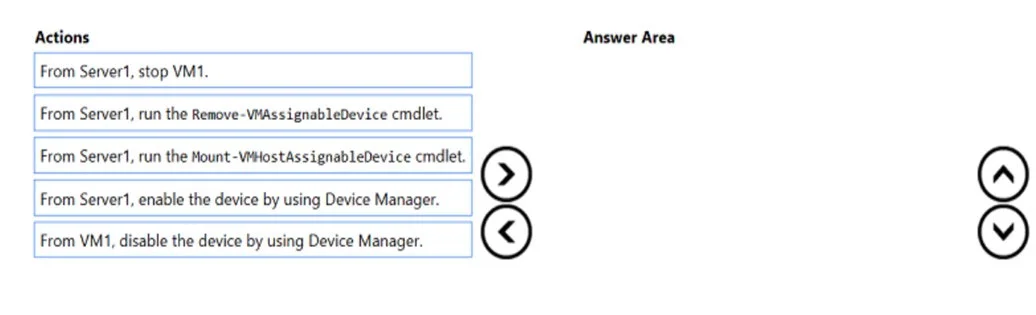
Answer Area
Drag items
Correct arrangement
- From Server1, stop VM1.
- From Server1, run the Remove-VMAssignableDevice cmdlet.
- From Server1, run the Mount-VMHostAssignableDevice cmdlet.
- From Server1, enable the device by using Device Manager.
Explanation
To return a Discrete Device Assignment (DDA) NVMe device from a virtual machine back to the Hyper-V host, the VM must be stopped, the device's assignment removed, the device mounted back to the host, and then enabled in Device Manager.
Approach. The correct sequence of actions to return a DDA-assigned device from a VM to the host is as follows:
-
From Server1, stop VM1. - Discrete Device Assignment (DDA) devices cannot be reconfigured or unassigned while the virtual machine is running. Stopping the VM ensures that the device is no longer in active use by the guest operating system.
-
From Server1, run the Remove-VMAssignableDevice cmdlet. - This PowerShell cmdlet, executed on the Hyper-V host, explicitly removes the DDA assignment of the NVMe device from VM1. This detaches the device from the virtual machine's configuration.
-
From Server1, run the Mount-VMHostAssignableDevice cmdlet. - After removing the device's assignment from the VM, this cmdlet is used on the host to 'mount' or prepare the device for use by the Hyper-V host operating system. When a device is initially prepared for DDA, it is 'dismounted' from the host; this command reverses that process, making it visible and manageable by the host's device stack.
-
From Server1, enable the device by using Device Manager. - Although the device is now logically mounted to the host, it might still be in a disabled state from the host's perspective, especially if it was previously prepared for DDA. Enabling it in Device Manager on Server1 makes it fully functional and available for the host's use.
Common mistakes.
- common_mistake. The action 'From VM1, disable the device by using Device Manager.' is incorrect because disabling a device within the guest VM does not release its Discrete Device Assignment (DDA) to the host. DDA directly passes the hardware through to the VM, bypassing Hyper-V's virtualization layer for that device. To reclaim the device for the host, the DDA assignment itself must be undone from the Hyper-V host using the appropriate PowerShell cmdlets, not by interacting with Device Manager inside the VM. Other common mistakes include attempting to remove the device assignment without stopping the VM first, or forgetting to mount and enable the device on the host after unassigning it from the VM.
Concept tested. This question tests the understanding of Discrete Device Assignment (DDA) in Hyper-V, specifically the process of managing the lifecycle of DDA-assigned devices, including how to release a device from a virtual machine and re-assign it back to the Hyper-V host. It requires knowledge of the correct sequence of operations, including stopping the VM and using relevant PowerShell cmdlets like Remove-VMAssignableDevice and Mount-VMHostAssignableDevice, as well as final device enablement on the host.
Topics
Community Discussion
No community discussion yet for this question.