
AZ-800 · Question #127
SIMULATION You need to collect errors from the System event log of SRV1 to a Log Analytics workspace. The required source files are located in a folder named \\dc1.contoso.com\install. To complete…
The correct answer is A. Configure Windows event logs Configure Windows event logs from the Agents configuration menu for the Log Analytics workspace. Step 1: Go to the Log Analytics workspaces menu in the Azure portal. Configure data sources To configure data sour. To collect specific Windows event log errors from SRV1 into a Log Analytics workspace, you must configure the agent's data sources within the Azure portal.
Question
SIMULATION You need to collect errors from the System event log of SRV1 to a Log Analytics workspace. The required source files are located in a folder named \dc1.contoso.com\install. To complete this task, sign in the required computer or computers. Answer:
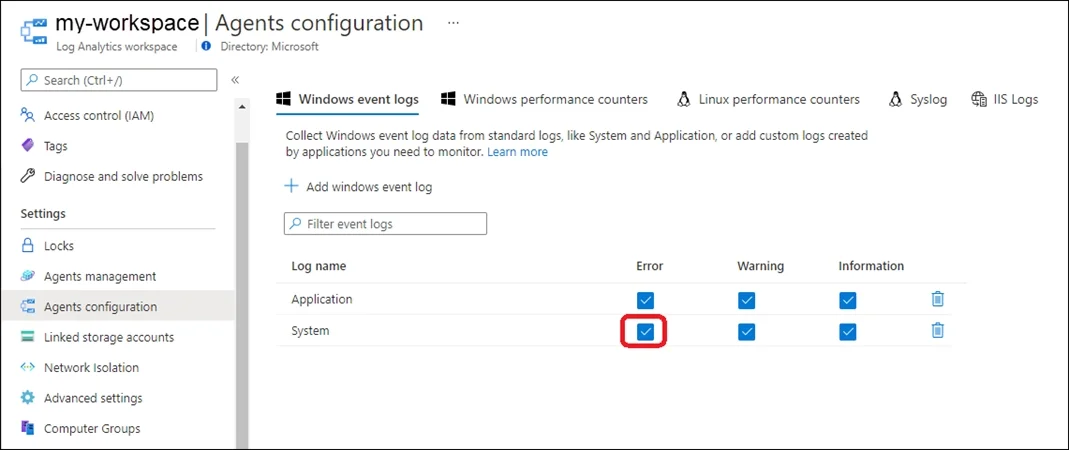
Configure Windows event logs Configure Windows event logs from the Agents configuration menu for the Log Analytics workspace. Step 1: Go to the Log Analytics workspaces menu in the Azure portal. Configure data sources To configure data sources for Log Analytics agents, go to the Log Analytics workspaces menu in the Azure portal and select a workspace. Step 2: Select Agents configuration. Step 3: Select the tab for the data source you want to configure. In this case the Windows event log of SRV1. Step 4: Select only Error option in the System Log row. Azure Monitor only collects events from Windows event logs that are specified in the settings. Reference:
https://learn.microsoft.com/en-us/azure/azure-monitor/agents/data-sources-windows-events https://learn.microsoft.com/en-us/azure/azure-monitor/agents/agent-data-sources#configure-data- sources
Exhibit
Options
- AConfigure Windows event logs Configure Windows event logs from the Agents configuration menu for the Log Analytics workspace. Step 1: Go to the Log Analytics workspaces menu in the Azure portal. Configure data sources To configure data sour
How the community answered
(58 responses)- A100% (58)
Why each option
To collect specific Windows event log errors from SRV1 into a Log Analytics workspace, you must configure the agent's data sources within the Azure portal.
Configuring Windows event logs for a Log Analytics workspace involves navigating to the Agents configuration menu in the Azure portal for the specific workspace. From there, you can select the Windows Event Logs tab, add the desired log (e.g., 'System'), and specify the event level (e.g., 'Error') to be collected by the Log Analytics agent on SRV1.
Concept tested: Log Analytics agent event log configuration
Source: https://learn.microsoft.com/en-us/azure/azure-monitor/agents/data-sources-windows-events
Topics
Community Discussion
No community discussion yet for this question.