
AZ-800 · Question #243
Your network contains an Active Directory Domain Services (AD DS) domain. The domain contains two servers named Server1 and Server2 and the users shown in the following table. Which users can…
The correct answer is E. User1, User2, User3, and User4. All users listed can establish a PowerShell remoting session from Server1 to Server2 because the default WinRM configuration on domain-joined servers typically allows Authenticated Users, including regular Domain Users, to connect, in addition to users in the local…
Question
Your network contains an Active Directory Domain Services (AD DS) domain. The domain contains two servers named Server1 and Server2 and the users shown in the following table. Which users can establish a PowerShell remoting session from Server1 to Server2?
Exhibit
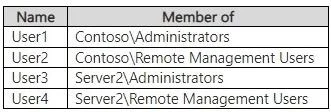
Options
- AUser1 and User3 only
- BUser2 and User4 only
- CUser3 and User4 only
- DUser1, User3, and User4 only
- EUser1, User2, User3, and User4
How the community answered
(20 responses)- A5% (1)
- C5% (1)
- D10% (2)
- E80% (16)
Why each option
All users listed can establish a PowerShell remoting session from Server1 to Server2 because the default WinRM configuration on domain-joined servers typically allows Authenticated Users, including regular Domain Users, to connect, in addition to users in the local Administrators or Remote Management Users groups.
In a default Active Directory domain environment, any Domain User (User1) can establish a PowerShell remoting session to a domain-joined server, as Authenticated Users typically have default WinRM permissions. Additionally, Remote Management Users (User2), local Administrators (User3), and Domain Admins (User4, who are local administrators by default) also have the necessary permissions.
Concept tested: PowerShell remoting, WinRM permissions, AD group membership
Source: https://learn.microsoft.com/en-us/powershell/module/microsoft.powershell.core/about/about_remote_requirements
Topics
Community Discussion
No community discussion yet for this question.