
AZ-800 · Question #129
SIMULATION You need to enable nested virtualization for a virtual machine named VM1 on SRV1. To complete this task, sign in the required computer or computers. Answer: Configure Nested…
The correct answer is A. Ntdsutil.exe. To enable nested virtualization for VM1 on SRV1, the Hyper-V host must be configured to expose virtualization extensions to the virtual machine.
Question
SIMULATION You need to enable nested virtualization for a virtual machine named VM1 on SRV1. To complete this task, sign in the required computer or computers. Answer:
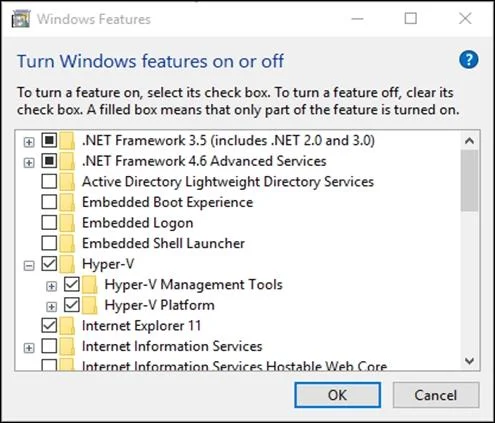
Configure Nested Virtualization Step 1: While the virtual machine is in the OFF state, run the following command on the physical Hyper-V host, in this case on SRV1. This enables nested virtualization for the virtual machine. Step 2: Set-VMProcessor -VMName <VMName> -ExposeVirtualizationExtensions $true In our case: Set-VMProcessor -VMName VM1 -ExposeVirtualizationExtensions $true Step 3: Start the virtual machine. Install Hyper-V within the virtual machine, just like you would for a physical server. Enable the Hyper-V role through Settings Step 4: Right click on the Windows button and select ‘Apps and Features’. Step 5: Select Programs and Features on the right under related settings. Step 6: Select Turn Windows Features on or off. Step 7: Select Hyper-V and click OK. When the installation has completed you are prompted to restart your computer. Reference:
https://learn.microsoft.com/en-us/virtualization/hyper-v-on-windows/user-guide/nested- virtualization https://learn.microsoft.com/en-us/virtualization/hyper-v-on-windows/quick-start/enable-hyper-v
Exhibit
Options
- ANtdsutil.exe
- BActive Directory Sites and Services
- CSet-DnsServer
- DDNS Manager
How the community answered
(17 responses)- A76% (13)
- B6% (1)
- C12% (2)
- D6% (1)
Why each option
To enable nested virtualization for VM1 on SRV1, the Hyper-V host must be configured to expose virtualization extensions to the virtual machine.
Enabling nested virtualization requires running the `Set-VMProcessor` PowerShell cmdlet on the physical Hyper-V host (SRV1) while the virtual machine (VM1) is turned off. The `-ExposeVirtualizationExtensions $true` parameter is essential to allow the guest VM to utilize hardware virtualization capabilities, which is necessary for it to run its own Hyper-V role.
Active Directory Sites and Services is a graphical tool for managing Active Directory topology and replication, not for configuring Hyper-V virtualization settings.
Set-DnsServer is a PowerShell cmdlet used for managing DNS server settings, unrelated to virtual machine processor features.
DNS Manager is a graphical tool for managing DNS zones and records, which has no function for Hyper-V nested virtualization.
Concept tested: Hyper-V nested virtualization
Source: https://learn.microsoft.com/en-us/virtualization/hyper-v-on-windows/user-guide/nested-virtualization
Topics
Community Discussion
No community discussion yet for this question.