
AZ-500 · Question #93
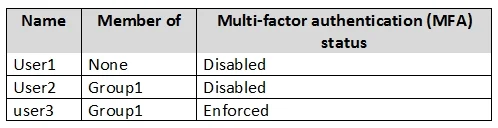
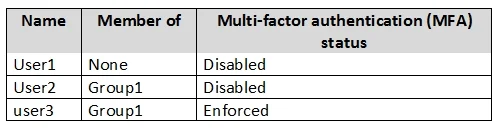
Hotspot Question You have an Azure Active Directory (Azure AD) tenant named contoso.com that contains the users shown in the following table. Azure AD Privileged Identity Management (PIM) is enabled…
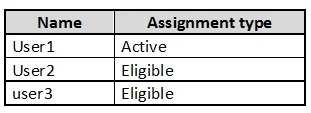
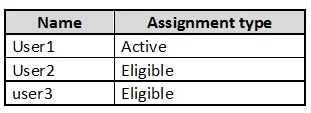
The correct answer is When User1 signs in, the user is assigned the Password Administrator role automatically. = Yes; User2 can request to activate the Password Administrator role. = Yes; If User3 wants to activate the Password Administrator role, the user can approve their own request. = No. Here's the breakdown: 1. When User1 signs in, the user is assigned the Password Administrator role automatically. => Yes The table shows User1 has an "Active" assignment type for the Password Administrator role. According to the explanation, an "Active" assignment means the…
Question
Exhibits
Answer Area
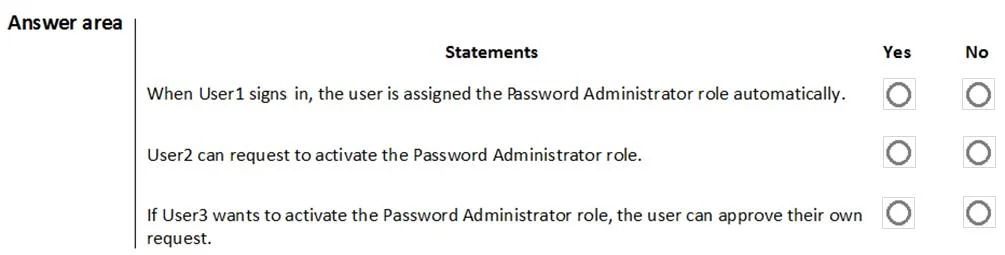
- When User1 signs in, the user is assigned the Password Administrator role automatically.Yes
- User2 can request to activate the Password Administrator role.Yes
- If User3 wants to activate the Password Administrator role, the user can approve their own request.No
Explanation
Here's the breakdown:
-
When User1 signs in, the user is assigned the Password Administrator role automatically. => Yes
- The table shows User1 has an "Active" assignment type for the Password Administrator role. According to the explanation, an "Active" assignment means the user does not need to go through the activation process. The role is directly assigned upon signing in, making the activation requirements (like MFA) irrelevant for this user. Thus, User1 receives the role automatically.
-
User2 can request to activate the Password Administrator role. => Yes
- The table indicates User2 has an "Eligible" assignment type for the Password Administrator role. An "Eligible" assignment means the user can request to activate the role. The question asks if User2 can request, not if they can successfully complete the activation process (which would require meeting PIM's MFA and approval requirements). The explanation confirms that an eligible user can indeed make a request for activation.
-
If User3 wants to activate the Password Administrator role, the user can approve their own request. => No
- User3 has an "Eligible" assignment and is a member of "Group1". The PIM settings for the Password Administrator role state that approval is required to activate the role, and "Group1" is the selected approver. However, PIM policies prevent a user from approving their own request, even if they are part of the designated approver group. The explanation explicitly states that the requester cannot approve their own request, and others in the group would receive it for approval.
Topics
Community Discussion
No community discussion yet for this question.