
AZ-500 · Question #639
Hotspot Question You have a management group named MG1 that contains an Azure subscription named Sub1. Sub1 contains the resources shown in the following table. You need to protect the resources in…
The correct answer is RG1 - Defender for Servers Plan 1: No; RG1 - Defender for Key Vault: No; VM1 - Defender for Servers Plan 1: Yes; VM1 - Defender for Key Vault: No; Vault1 - Defender for Servers Plan 1: No; Vault1 - Defender for Key Vault: Yes; Workspace1 - Defender for Servers Plan 1: No; Workspace1 - Defender for Key Vault: No. Microsoft Defender for Servers Plan 1 & Defender for Key Vault - Hotspot Explanation Core Concepts Defender for Servers Plan 1 can be enabled at two scopes: Subscription level (via Microsoft Defender for Cloud settings) Individual VM/Arc machine level (directly on the resource)…
Question
Exhibits
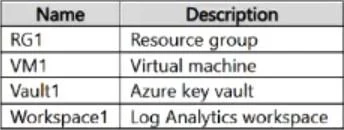
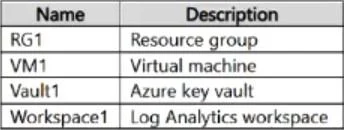
Answer Area
- RG1 - Defender for Servers Plan 1NoYesNo
- RG1 - Defender for Key VaultNoYesNo
- VM1 - Defender for Servers Plan 1YesYesNo
- VM1 - Defender for Key VaultNoYesNo
- Vault1 - Defender for Servers Plan 1NoYesNo
- Vault1 - Defender for Key VaultYesYesNo
- Workspace1 - Defender for Servers Plan 1NoYesNo
- Workspace1 - Defender for Key VaultNoYesNo
Explanation
Microsoft Defender for Servers Plan 1 & Defender for Key Vault - Hotspot Explanation
Core Concepts
Defender for Servers Plan 1 can be enabled at two scopes:
- Subscription level (via Microsoft Defender for Cloud settings)
- Individual VM/Arc machine level (directly on the resource)
It cannot be enabled on resource groups or workspaces - those are not valid scopes for this plan.
Defender for Key Vault can be enabled at two scopes:
- Subscription level
- Individual Key Vault resource level
It cannot be enabled on resource groups, VMs, or workspaces.
Per-Dropdown Breakdown
1. RG1 - Defender for Servers Plan 1: No Resource groups are logical containers only. Defender plans are scoped to subscriptions or individual resources - never to resource groups. There is no option in the Azure portal to enable Defender for Servers on an RG.
2. RG1 - Defender for Key Vault: No Same reason as above. Resource groups have no Defender plan configuration surface in the portal. Defender for Key Vault is not assignable at the RG level.
3. VM1 - Defender for Servers Plan 1: Yes This is the key scenario. Microsoft Defender for Servers Plan 1 supports resource-level enablement on individual virtual machines (and Azure Arc machines). In the portal, you can navigate to the VM -> Microsoft Defender for Cloud blade and toggle the plan directly on that VM, even if the subscription-level plan is off.
4. VM1 - Defender for Key Vault: No Defender for Key Vault is a threat protection plan specifically for Key Vault resources. A VM is not a Key Vault - this plan simply does not apply to compute resources. The two plans protect entirely different resource types.
5. Vault1 - Defender for Servers Plan 1: No A Key Vault is not a server. Defender for Servers protects compute workloads (VMs, Arc-enabled servers). It has no relevance to, and cannot be enabled on, a Key Vault resource.
6. Vault1 - Defender for Key Vault: Yes This is the correct target. Defender for Key Vault can be enabled at the individual Key Vault resource level in the portal (via the Key Vault -> Microsoft Defender for Cloud blade). This provides threat detection for anomalous access patterns, suspicious operations, and potential exfiltration attempts against that specific vault.
7. Workspace1 - Defender for Servers Plan 1: No A Log Analytics Workspace is a monitoring/data resource, not a compute resource. While Defender for Servers uses a workspace for data collection, the plan itself cannot be enabled on a workspace. Enablement happens at the subscription or VM level.
8. Workspace1 - Defender for Key Vault: No A workspace is not a Key Vault. Defender for Key Vault is scoped to Key Vault resources only. Log Analytics Workspaces have no Defender for Key Vault configuration option.
Summary Table
| Resource | Defender for Servers Plan 1 | Defender for Key Vault |
|---|---|---|
| RG1 (Resource Group) | No - wrong scope type | No - wrong scope type |
| VM1 (Virtual Machine) | Yes - supported at resource level | No - wrong resource type |
| Vault1 (Key Vault) | No - wrong resource type | Yes - supported at resource level |
| Workspace1 (Log Analytics) | No - wrong resource type | No - wrong resource type |
Rule of thumb: Each Defender plan only applies to the specific resource type it was designed to protect, and resource groups/workspaces are never valid enablement targets for individual Defender plans.
Topics
Community Discussion
No community discussion yet for this question.