
AZ-500 · Question #553
Hotspot Question You have a Microsoft Entra tenant that contains a user named User and a group named Group1. Group1 has Membership type set to Assigned. You need to perform the following actions…
The correct answer is Properties = Yes; Members = No; Owners = No; Roles and administrators = No; Administrative units = No; Group memberships = No; Applications = No; Licenses = No; Azure role assignments = Yes. This question tests knowledge of Microsoft Entra ID (Azure AD) group management settings, specifically how to convert a group to Dynamic User membership and how to delegate membership rule management to a specific user.
Question
Exhibit
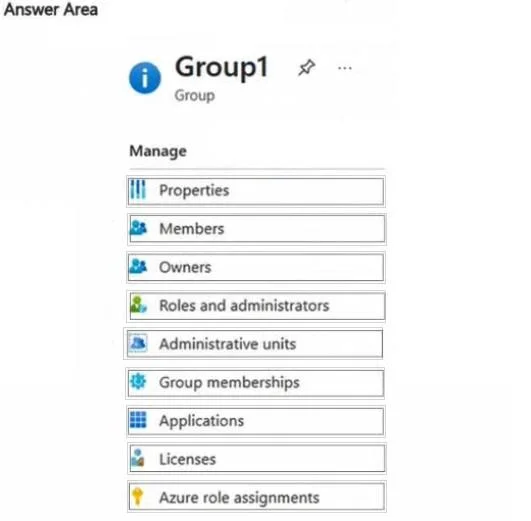
Answer Area
- PropertiesYes
- MembersNo
- OwnersNo
- Roles and administratorsNo
- Administrative unitsNo
- Group membershipsNo
- ApplicationsNo
- LicensesNo
- Azure role assignmentsYes
Explanation
This question tests knowledge of Microsoft Entra ID (Azure AD) group management settings, specifically how to convert a group to Dynamic User membership and how to delegate membership rule management to a specific user.
Approach. To change the Membership type from Assigned to Dynamic User for Group1, you must use the 'Properties' setting under the Manage section of the group, where you can change the membership type and define dynamic membership rules. To allow User1 to change the membership rules for Group1, you must use the 'Owners' setting under the Manage section - adding User1 as an Owner of Group1 grants them the ability to modify the dynamic membership rules. Group owners of dynamic groups have permission to edit the membership rules even without being a global administrator, making Owners the correct delegation mechanism here.
Concept tested. Microsoft Entra ID group management: converting group membership types to Dynamic User and delegating rule-editing permissions via group ownership. The key insight is that 'Properties' controls membership type configuration, while 'Owners' is the correct way to delegate dynamic rule management to a non-admin user.
Reference. https://learn.microsoft.com/en-us/entra/identity/users/groups-dynamic-membership
Topics
Community Discussion
No community discussion yet for this question.