
AZ-500 · Question #514
Hotspot Question You have a Microsoft Entra tenant that contains the users shown in the following table. From Microsoft Entra Privileged Identity Management (PIM), you configure the settings for the…
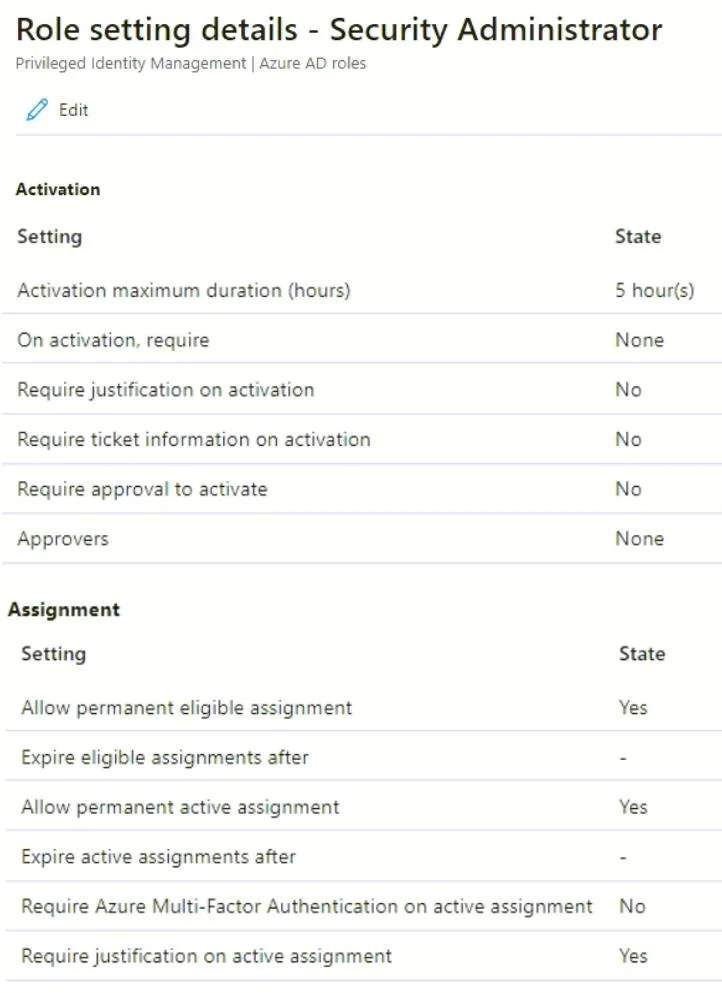
The correct answer is Require justification on activation = No; Require ticket information on activation = No; Require approval to activate = No; Allow permanent eligible assignment = Yes; Allow permanent active assignment = Yes; Require Azure Multi-Factor Authentication on active assignment = No; Require justification on active assignment = Yes. This hotspot question tests understanding of Microsoft Entra Privileged Identity Management (PIM) role assignments, specifically how Active vs Eligible assignment types and PIM settings (like MFA requirements and activation duration) apply to users through group membership.
Question
Exhibits
Answer Area
- Activation maximum duration (hours)
- On activation, require
- Require justification on activationNo
- Require ticket information on activationNo
- Require approval to activateNo
- Approvers
- Allow permanent eligible assignmentYes
- Expire eligible assignments after
- Allow permanent active assignmentYes
- Expire active assignments after
- Require Azure Multi-Factor Authentication on active assignmentNo
- Require justification on active assignmentYes
Explanation
This hotspot question tests understanding of Microsoft Entra Privileged Identity Management (PIM) role assignments, specifically how Active vs Eligible assignment types and PIM settings (like MFA requirements and activation duration) apply to users through group membership.
Approach. When a group has an Active assignment type in PIM, members have the role continuously without needing to activate it - they are always active Security Administrators. When a group has an Eligible assignment type, members must activate the role manually and are subject to PIM settings such as MFA requirements, justification, and maximum activation duration. Users in Group1 (Active, permanent) already have the Security Administrator role active at all times, so PIM activation settings like MFA or activation duration do NOT apply to them. Users in Group2 (Eligible, permanent) must activate the role and ARE subject to PIM settings - including requiring MFA on activation and the configured maximum activation duration (e.g., 8 hours). If a user is a member of both Group1 and Group2, they already have an active assignment via Group1, so they do not need to activate through Group2. PIM settings configured for the role (such as requiring MFA, requiring justification, or setting activation duration) only enforce on the activation process for eligible assignments, not on already-active assignments.
Concept tested. Microsoft Entra PIM role assignment types (Active vs Eligible), how PIM settings (MFA on activation, maximum activation duration, justification) apply differently based on assignment type, and how group-based PIM assignments flow down to individual users.
Topics
Community Discussion
No community discussion yet for this question.