
AZ-500 · Question #513
Hotspot Question Your network contains an on-premises Active Directory domain named adatum.com that syncs to a Microsoft Entra tenant. The Microsoft Entra tenant contains the users shown in the…
The correct answer is User1 = No; User2 = No; User3 = Yes. This question tests understanding of Microsoft Entra Password Protection for on-premises Active Directory, including how custom banned password lists, lockout thresholds, and enforcement modes apply to different user types (cloud-only vs. synced/hybrid users).
Question
Exhibits
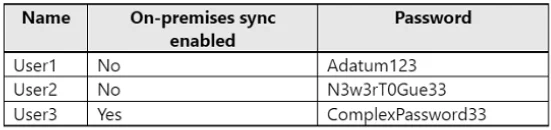
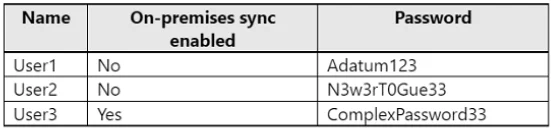
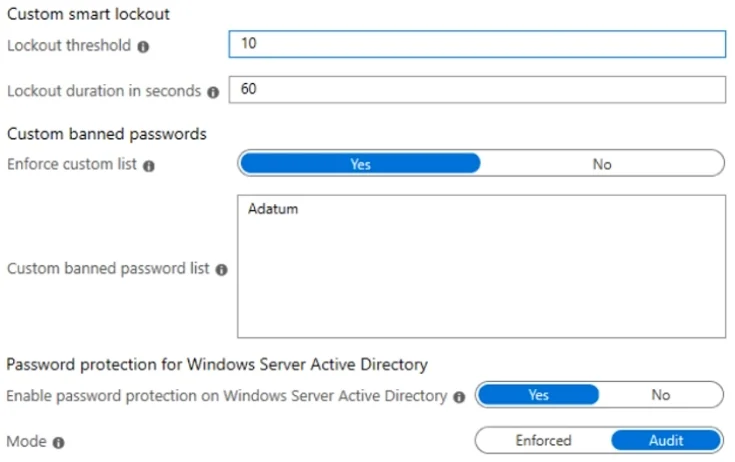
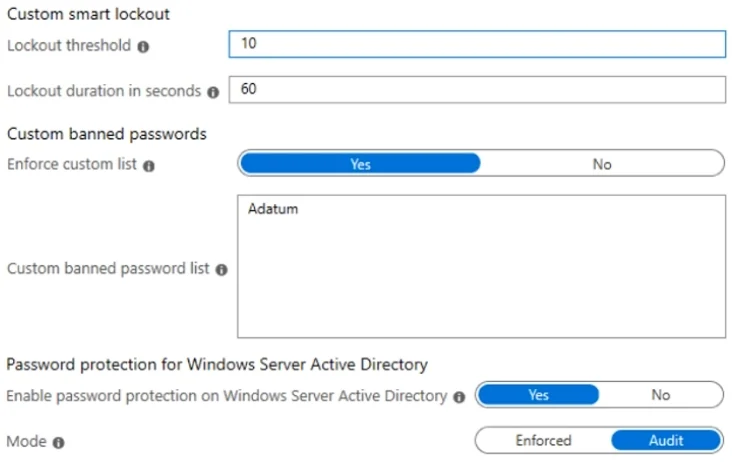
Answer Area
- User1No
- User2No
- User3Yes
Explanation
This question tests understanding of Microsoft Entra Password Protection for on-premises Active Directory, including how custom banned password lists, lockout thresholds, and enforcement modes apply to different user types (cloud-only vs. synced/hybrid users).
Approach. Microsoft Entra Password Protection works by deploying a DC Agent on on-premises domain controllers and a Proxy service to communicate with Microsoft Entra ID. The key concepts are: (1) Password Protection only enforces banned password policies on on-premises AD users whose passwords are changed/reset through the DC Agent - cloud-only users (those not synced from on-premises AD) are NOT protected by the on-premises DC Agent, they follow cloud password policies separately. (2) The 'Enforce custom list' setting with a custom banned password list means that passwords containing those banned terms (including fuzzy matching/variations) are rejected for on-premises AD accounts during password change/reset events processed by the DC Agent. (3) The 'Mode' setting (Audit vs. Enforced) determines whether bad passwords are actually blocked (Enforced) or just logged (Audit). In Audit mode, banned passwords are logged but NOT rejected. (4) The smart lockout thresholds configured in the portal apply to Microsoft Entra ID cloud authentication - on-premises AD uses its own lockout policies via the DC Agent component. Statements about cloud-only users being protected by on-premises Password Protection would be No, statements about banned passwords being blocked when Mode is set to Enforced would be Yes, and statements about Audit mode blocking passwords would be No.
Concept tested. Microsoft Entra Password Protection for on-premises Active Directory - specifically how DC Agent enforcement modes (Audit vs. Enforced), custom banned password lists, smart lockout settings, and scope of protection (cloud-only users vs. synced/hybrid users) interact to determine whether passwords are blocked or merely logged.
Reference. https://learn.microsoft.com/en-us/entra/identity/authentication/concept-password-ban-bad-on-premises
Topics
Community Discussion
No community discussion yet for this question.