
AZ-500 · Question #468
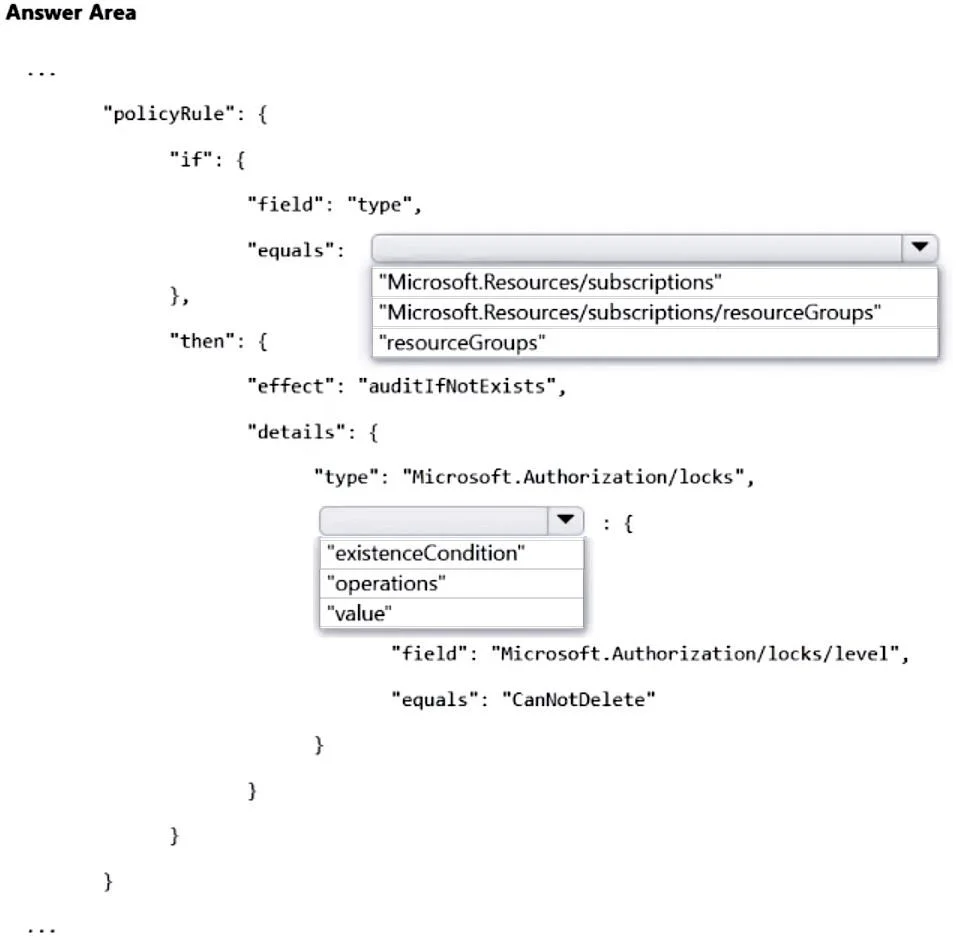
Hotspot Question You plan to deploy a custom policy initiative for Microsoft Defender for Cloud. You need to identify all the resource groups that have a Delete lock. How should you complete the…
The correct answer is policyRule.if.equals: "resourceGroups"; policyRule.then.details.type["Microsoft.Authorization/locks"] object property: "existenceCondition". This question tests knowledge of Azure Policy definition syntax, specifically how to write a policy that audits resource groups containing a 'Delete' lock using the correct 'type' and 'field' conditions.
Question
Exhibit
Answer Area
- policyRule.if.equals"resourceGroups""Microsoft.Resources/subscriptions""Microsoft.Resources/subscriptions/resourceGroups""resourceGroups"
- policyRule.then.details.type["Microsoft.Authorization/locks"] object property"existenceCondition""existenceCondition""operations""value"
Explanation
This question tests knowledge of Azure Policy definition syntax, specifically how to write a policy that audits resource groups containing a 'Delete' lock using the correct 'type' and 'field' conditions.
Approach. The correct policy definition uses 'Microsoft.Authorization/locks' as the resource type to target lock resources, and sets 'field' to 'Microsoft.Authorization/locks/level' with a condition checking for the value 'CanNotDelete' (which represents a Delete lock in Azure). The policy should use 'existenceCondition' within an 'AuditIfNotExists' or similar effect scoped to resource groups. The 'type' field must be set to 'Microsoft.Authorization/locks' and the 'field' condition must evaluate 'Microsoft.Authorization/locks/level' equals 'CanNotDelete' to correctly identify Delete locks as opposed to ReadOnly locks.
Concept tested. Azure Policy definition authoring - specifically using the correct resource provider type 'Microsoft.Authorization/locks' and the lock level property 'Microsoft.Authorization/locks/level' with value 'CanNotDelete' to identify Delete locks on resource groups in a custom Defender for Cloud policy initiative.
Reference. https://docs.microsoft.com/en-us/azure/governance/policy/concepts/definition-structure and https://docs.microsoft.com/en-us/azure/azure-resource-manager/management/lock-resources
Topics
Community Discussion
No community discussion yet for this question.