
AZ-500 · Question #184
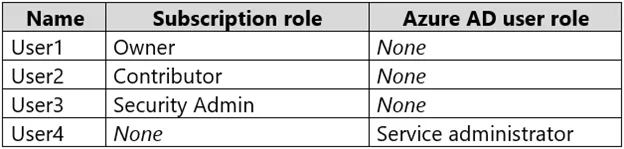
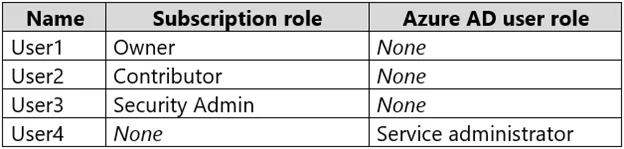
Hotspot Question You have an Azure subscription that contains an Azure Active Directory (Azure AD) tenant named contoso.com. The tenant contains the users shown in the following table. You create a…
The correct answer is User1 can modify the permissions for RG1 = Yes; User1 can create virtual networks in RG1 = Yes; User2 can modify the permissions for RG1 = No; User2 can create virtual networks in RG1 = Yes; User3 can modify the permissions for RG1 = No; User3 can create virtual networks in RG1 = No; User4 can modify the permissions for RG1 = Yes; User4 can create virtual networks in RG1 = Yes. This question tests understanding of Azure RBAC roles and their permissions regarding resource group access control and resource creation. Specifically, it evaluates which built-in roles allow modifying permissions (Owner) versus creating resources (Owner and Contributor).
Question
Exhibits
Answer Area
- User1 can modify the permissions for RG1Yes
- User1 can create virtual networks in RG1Yes
- User2 can modify the permissions for RG1No
- User2 can create virtual networks in RG1Yes
- User3 can modify the permissions for RG1No
- User3 can create virtual networks in RG1No
- User4 can modify the permissions for RG1Yes
- User4 can create virtual networks in RG1Yes
Explanation
This question tests understanding of Azure RBAC roles and their permissions regarding resource group access control and resource creation. Specifically, it evaluates which built-in roles allow modifying permissions (Owner) versus creating resources (Owner and Contributor).
Approach. To modify permissions (i.e., manage role assignments) on a resource group, a user must have the 'Owner' role or a custom role with Microsoft.Authorization/roleAssignments/write permission - 'Contributor' cannot modify permissions. To create virtual networks in RG1, a user needs at least 'Contributor' rights (which includes Microsoft.Network/virtualNetworks/write), so both Owner and Contributor role holders can create VNets. User1 with Owner role can both modify permissions AND create VNets; User2 with Contributor role can only create VNets but NOT modify permissions; User3 with Reader role can do neither. The key distinction is that Owner = full control including access management, while Contributor = full resource management but NO access management.
Concept tested. Azure Role-Based Access Control (RBAC) - specifically the differences between Owner, Contributor, and Reader built-in roles, with emphasis on the Microsoft.Authorization/roleAssignments/write permission that is exclusive to the Owner role for managing resource group permissions.
Reference. https://docs.microsoft.com/en-us/azure/role-based-access-control/built-in-roles
Topics
Community Discussion
No community discussion yet for this question.