
AZ-500 · Question #11
Case Study 2 - Contoso, Ltd Overview Contoso, Ltd. is a consulting company that has a main office in Montreal and two branch offices in Seattle and New York. The company hosts its entire server…
Contoso Case Study - Virtual Network Modify vs. Delete Rights The entire question turns on Azure Resource Lock behavior applied at the Resource Group level, combined with User2 having sufficient role permissions (Contributor or higher) on the relevant RGs since they created the…
Question
Exhibit
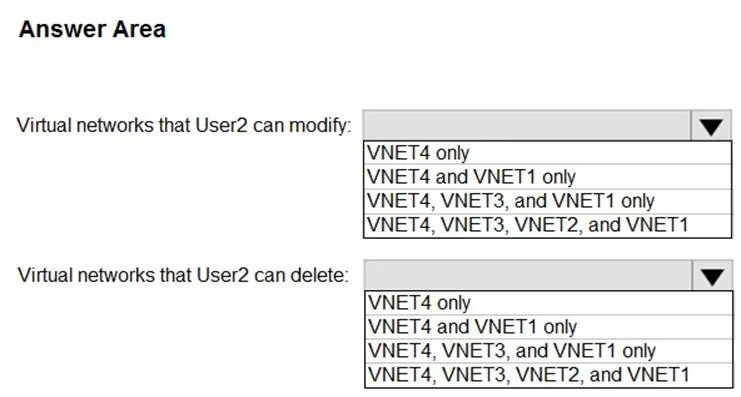
Answer Area
- Virtual networks that User2 can modify:VNET4 onlyVNET4 and VNET1 onlyVNET4, VNET3, and VNET1 onlyVNET4, VNET3, VNET2, and VNET1
- Virtual networks that User2 can delete:VNET4 onlyVNET4 and VNET1 onlyVNET4, VNET3, and VNET1 onlyVNET4, VNET3, VNET2, and VNET1
Explanation
Contoso Case Study - Virtual Network Modify vs. Delete Rights
The entire question turns on Azure Resource Lock behavior applied at the Resource Group level, combined with User2 having sufficient role permissions (Contributor or higher) on the relevant RGs since they created the VNets.
Azure Resource Lock Types - The Core Concept
| Lock Type | Prevents Modify? | Prevents Delete? |
|---|---|---|
| Delete | No | Yes |
| ReadOnly | Yes | Yes |
Locks apply hierarchically - a lock on a Resource Group applies to all resources within it.
The Lock-to-VNet Mapping
| VNet | Resource Group | Lock Type | Can Modify? | Can Delete? |
|---|---|---|---|---|
| VNET1 | RG1 | Delete | Yes | No |
| VNET2 | RG2 | ReadOnly | No | No |
| VNET3 | RG3 | Delete | Yes | No |
| VNET4 | RG6 | None | Yes | Yes |
Dropdown 1: Virtual networks User2 can MODIFY
Correct Answer: VNET4, VNET3, and VNET1 only
- VNET1 - RG1 has a Delete lock. Delete locks block only deletion; modifications are still permitted.
- VNET3 - RG3 has a Delete lock. Same reasoning - modify is allowed.
- VNET4 - RG6 has no lock at all. Full modify and delete rights.
- VNET2 is excluded - RG2 has a ReadOnly lock. This is the strictest lock type and blocks all write operations including modifications.
Why the other options are wrong:
- VNET4 only - Ignores that Delete-locked resources can still be modified.
- VNET4 and VNET1 only - Incorrectly excludes VNET3, which also only has a Delete lock.
- VNET4, VNET3, VNET2, and VNET1 - Incorrectly includes VNET2, which is blocked by a ReadOnly lock.
Dropdown 2: Virtual networks User2 can Delete
Correct Answer: VNET4 only
- VNET4 - No lock on RG6, so deletion is fully permitted.
- VNET1 excluded - RG1's Delete lock explicitly prevents deletion, regardless of the user's role.
- VNET2 excluded - RG2's ReadOnly lock also prevents deletion.
- VNET3 excluded - RG3's Delete lock prevents deletion.
Why the other options are wrong:
- VNET4 and VNET1 only - VNET1 cannot be deleted; its RG has a Delete lock.
- VNET4, VNET3, and VNET1 only - Neither VNET1 nor VNET3 can be deleted due to their Delete locks.
- VNET4, VNET3, VNET2, and VNET1 - All three non-VNET4 networks are protected by locks.
Key Takeaway
Delete lock = "You can still change it, you just can't remove it." ReadOnly lock = "You can't touch it at all - not modify, not delete."
A common exam trap is assuming a Delete lock also prevents modifications - it does not.
Topics
Community Discussion
No community discussion yet for this question.