
AZ-400 · Question #448
Hotspot Question You have an Azure virtual machine named web1. You need to query the amount of free memory that was available on web1 during the past seven days. The solution must meet the following…
The correct answer is TimeGenerated condition: TimeGenerated > ago(7d); summarize by bin: bin(TimeGenerated, 1h). This question tests your ability to write a KQL (Kusto Query Language) query to retrieve VM memory metrics from Azure Monitor Logs, filtering by time range, summarizing by hourly averages, and rendering as a time chart.
Question
Exhibit
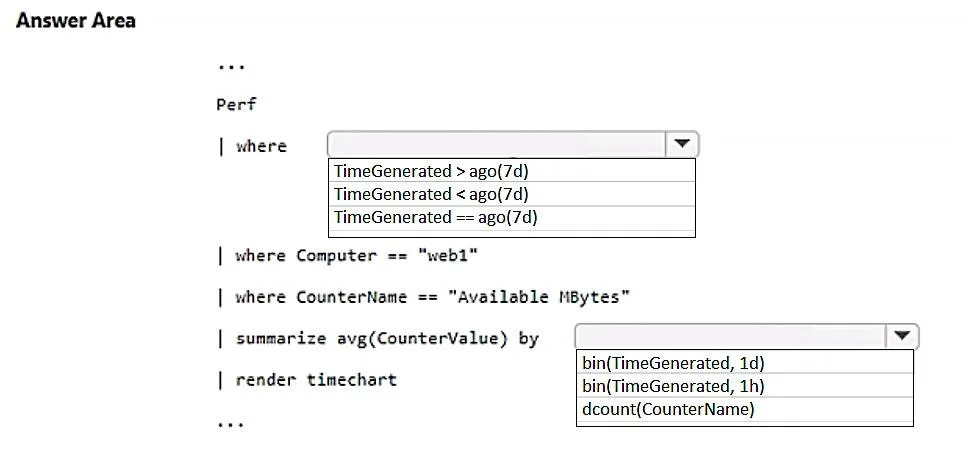
Answer Area
- TimeGenerated conditionTimeGenerated > ago(7d)TimeGenerated > ago(7d)TimeGenerated < ago(7d)TimeGenerated == ago(7d)
- summarize by binbin(TimeGenerated, 1h)bin(TimeGenerated, 1d)bin(TimeGenerated, 1h)dcount(CounterName)
Explanation
This question tests your ability to write a KQL (Kusto Query Language) query to retrieve VM memory metrics from Azure Monitor Logs, filtering by time range, summarizing by hourly averages, and rendering as a time chart.
Approach. The correct KQL query uses the 'Perf' table to query performance data, filtering with 'where TimeGenerated > ago(7d)' for the past seven days and 'where ObjectName == "Memory" and CounterName == "Available MBytes"' and 'where Computer == "web1"' to target free memory on the specific VM. The 'summarize avg(CounterValue) by bin(TimeGenerated, 1h)' clause calculates the average value per hour using the bin() function to bucket timestamps into 1-hour intervals. Finally, 'render timechart' displays the result as a time chart. The full query is: Perf | where TimeGenerated > ago(7d) | where Computer == "web1" | where ObjectName == "Memory" and CounterName == "Available MBytes" | summarize avg(CounterValue) by bin(TimeGenerated, 1h) | render timechart
Concept tested. Writing KQL queries in Azure Monitor Log Analytics to analyze VM performance metrics, including time-range filtering with ago(), hourly aggregation using summarize with bin(), and visualization with render timechart.
Reference. https://learn.microsoft.com/en-us/azure/azure-monitor/logs/get-started-queries
Topics
Community Discussion
No community discussion yet for this question.