
AZ-400 · Question #327
Hotspot Question You plan to use Desired Slate Configuration (DSC) to maintain the configuration state of virtual machines that run Windows Server. You need to perform the following: - Install…
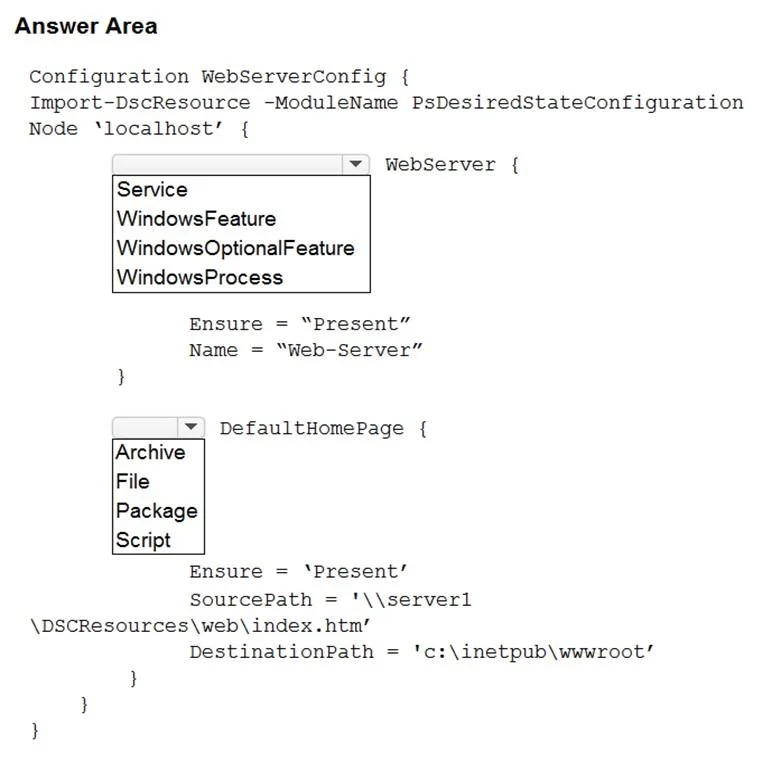
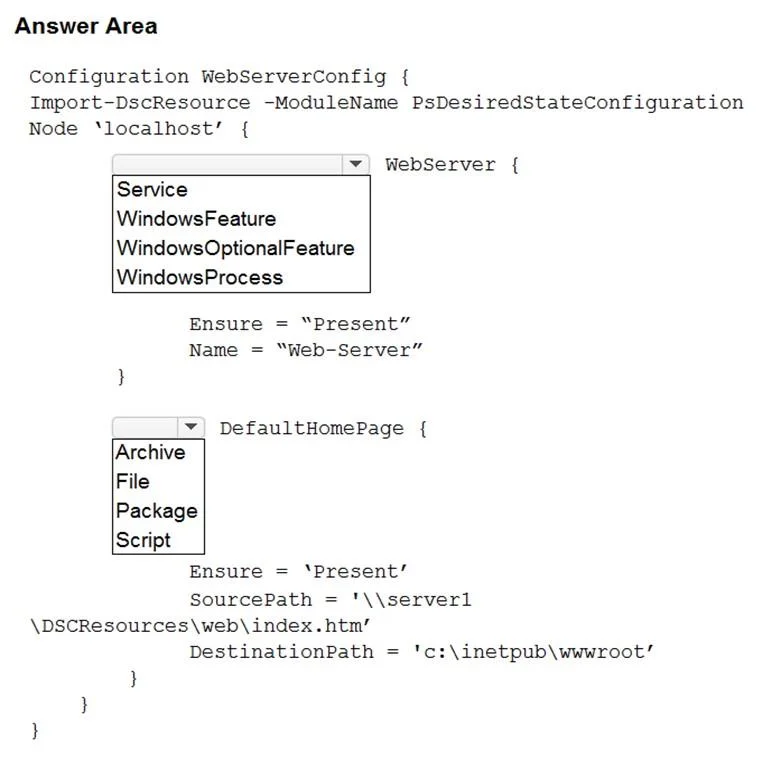
The correct answer is WebServer: WindowsFeature; DefaultHomePage: File. This question tests knowledge of PowerShell Desired State Configuration (DSC) syntax for configuring IIS on Windows Server, specifically using the correct DSC resource blocks to install IIS and manage web content.
Question
Exhibits
Answer Area
- WebServerWindowsFeatureServiceWindowsFeatureWindowsOptionalFeatureWindowsProcess
- DefaultHomePageFileArchiveFilePackageScript
Explanation
This question tests knowledge of PowerShell Desired State Configuration (DSC) syntax for configuring IIS on Windows Server, specifically using the correct DSC resource blocks to install IIS and manage web content.
Approach. To install IIS using DSC, you use the 'WindowsFeature' resource block with the Name property set to 'Web-Server' and Ensure set to 'Present'. To update the default home page content of the IIS web server, you use the 'File' resource block (or 'Script' resource) to manage the contents of the default document (typically C:\inetpub\wwwroot\iisstart.htm or Default.htm), setting the DestinationPath to the web root file path and Contents/SourcePath to the desired HTML content. The 'DependsOn' property should be used in the File resource to ensure IIS is installed before attempting to modify web content, referencing '[WindowsFeature]IIS' to enforce the correct order of operations.
Concept tested. PowerShell DSC configuration file structure, specifically the use of 'WindowsFeature' DSC resource to install IIS (Web-Server feature) and the 'File' DSC resource to manage/update the default IIS home page, along with proper use of 'DependsOn' to enforce resource ordering.
Reference. https://docs.microsoft.com/en-us/powershell/scripting/dsc/configurations/configurations
Topics
Community Discussion
No community discussion yet for this question.