
AZ-400 · Question #326
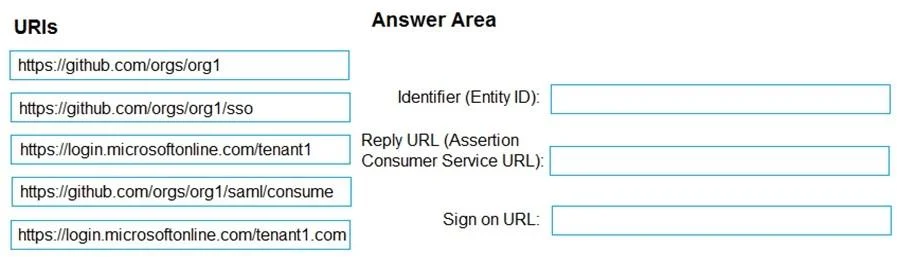
Drag and Drop Question You have a GitHub organization named org1 and an Azure tenant named Tenant1. You need to enable single sign-on (SSO) in Azure Active Directory (Azure AD) for the users in…
The correct answer is https://github.com/orgs/org1; https://github.com/orgs/org1/saml/consume; https://github.com/orgs/org1/sso. For GitHub SAML SSO configuration in Azure AD, the three required URIs map to specific SAML fields: the Identifier (Entity ID) uses 'https://github.com/orgs/org1' to uniquely identify the service provider, the Reply URL (Assertion Consumer Service URL) uses…
Question
Exhibit
Answer Area
Drag items
Explanation
For GitHub SAML SSO configuration in Azure AD, the three required URIs map to specific SAML fields: the Identifier (Entity ID) uses 'https://github.com/orgs/org1' to uniquely identify the service provider, the Reply URL (Assertion Consumer Service URL) uses 'https://github.com/orgs/org1/saml/consume' as the endpoint where GitHub receives and processes the SAML assertion from Azure AD, and the Sign-on URL uses 'https://github.com/orgs/org1/sso' as the URL users visit to initiate the SSO login flow. These are GitHub-defined endpoints specific to organizational SAML SSO and are well-documented in GitHub's SSO setup guide.
Topics
Community Discussion
No community discussion yet for this question.