
AZ-400 · Question #312
Hotspot Question You have an Azure virtual machine named VM1 that runs Linux. You plan to deploy the Desired State Configuration (DSC) extension to VM1. You need to grant the Log Analytics agent the…
This question tests your knowledge of granting directory permissions to the Log Analytics (OMS) agent on a Linux VM when deploying the DSC extension. The command uses 'chmod' with recursive options to set the appropriate permissions on the DSC-related directory.
Question
Exhibit
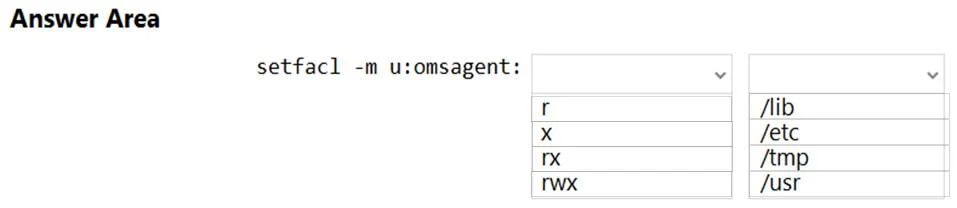
Answer Area
- Permissions for omsagentrxrxrwx
- Directory path/lib/etc/tmp/usr
Explanation
This question tests your knowledge of granting directory permissions to the Log Analytics (OMS) agent on a Linux VM when deploying the DSC extension. The command uses 'chmod' with recursive options to set the appropriate permissions on the DSC-related directory.
Approach. The correct command is: 'chmod -R 777 /etc/opt/microsoft/omsagent/sysconf/omsagent.d' or more specifically setting permissions on the '/tmp/WorkspaceSettings' or '/etc/opt/omi' directory. The key elements are: (1) using 'chmod' as the command to change file permissions, (2) using '-R' flag for recursive application to all subdirectories and files, (3) granting '777' (read/write/execute for all) or '755' permissions, and (4) targeting the correct directory path such as '/etc/opt/microsoft/omsagent/' or '/var/lib/waagent/' where the DSC extension and Log Analytics agent store their configuration files. The DSC extension on Linux requires the OMI (Open Management Infrastructure) and OMS agent directories to have appropriate permissions so the Log Analytics agent can read and write DSC configuration and report data.
Concept tested. Configuring Linux file system permissions using chmod for Azure Log Analytics (OMS) agent and DSC extension integration on Linux VMs. This involves understanding the directory structure used by Azure monitoring agents (/etc/opt/microsoft/omsagent/, /var/opt/microsoft/omsconfig/) and the appropriate permission levels required for proper agent operation.
Reference. https://docs.microsoft.com/en-us/azure/virtual-machines/extensions/dsc-linux
Topics
Community Discussion
No community discussion yet for this question.