
AZ-305 · Question #420
Hotspot Question You have an on-premises app named App1 that supports REST calls and webhooks. You have an Azure subscription. You plan to develop a new app named App2 that will send a Microsoft…
The optimal solution is to host App2 on Azure Logic Apps, triggered by HTTP, to minimize development effort when integrating an on-premises webhook with Microsoft Teams.
Question
Exhibit
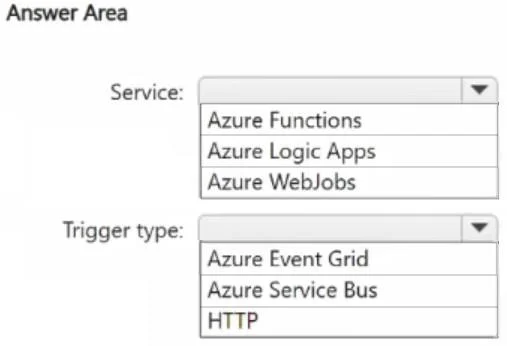
Answer Area
- Service:Azure FunctionsAzure Logic AppsAzure WebJobs
- Trigger type:Azure Event GridAzure Service BusHTTP
Explanation
The optimal solution is to host App2 on Azure Logic Apps, triggered by HTTP, to minimize development effort when integrating an on-premises webhook with Microsoft Teams.
Approach. To fulfill the requirements of hosting App2, triggering it when a new record is added to App1 (which supports REST/webhooks), and sending a Microsoft Teams message while minimizing development effort:
-
Select 'Azure Logic Apps' for Service: Azure Logic Apps are a serverless, low-code/no-code platform specifically designed for workflow automation and integrating various services using a rich set of connectors. For sending a Microsoft Teams message, Logic Apps offers a direct 'Post a message' connector, allowing the entire workflow to be built with minimal to no custom code. This approach significantly reduces development effort compared to writing custom code required by Azure Functions or setting up and managing an HTTP endpoint within Azure WebJobs. While Azure Functions can also address this, Logic Apps generally excel for pure integration and orchestration tasks due to their visual designer and extensive connector ecosystem, aligning perfectly with the 'minimize development effort' requirement.
-
Select 'HTTP' for Trigger type: The on-premises App1 supports 'webhooks'. A webhook is an HTTP callback, where App1 can send an HTTP POST request to a specified URL when a new record is added. Both Azure Logic Apps and Azure Functions provide an HTTP Request trigger that can directly receive these webhook calls. This is the most direct and lowest-effort method for App1 to initiate App2, as it leverages App1's existing webhook capability without requiring complex integrations with other services like Event Grid or Service Bus, which would entail more development work on App1's side.
Common mistakes.
- common_mistake. Common mistakes include:
- Selecting 'Azure Functions' for Service: Although Azure Functions support HTTP triggers and are serverless, building the integration to send a Teams message would require writing custom code (e.g., using a Teams SDK or making HTTP calls to the Teams webhook API). While functions are efficient, for a straightforward integration task like sending a message, Logic Apps' built-in connectors often result in even less development effort, making Logic Apps the superior choice for 'minimize development effort'.
- Selecting 'Azure WebJobs' for Service: The comparison table clearly shows that Azure WebJobs do not natively support HTTP/Webhook as a trigger event. While it's technically possible to host an HTTP endpoint within an App Service where a WebJob runs, it requires custom development to manage the endpoint and handle the incoming requests, which directly contradicts the 'minimize development effort' requirement. WebJobs are typically used for background tasks triggered by timers or Azure storage/messaging services.
- Selecting 'Azure Event Grid' for Trigger type: While Event Grid is excellent for event-driven architectures, integrating an on-premises application that supports only generic 'webhooks' (HTTP POSTs) would require App1 to be modified to specifically publish events to Event Grid's API. This adds development effort compared to App1 simply calling an HTTP endpoint.
- Selecting 'Azure Service Bus' for Trigger type: Similar to Event Grid, integrating App1 with Azure Service Bus (queues or topics) would require App1 to be modified to interact with Service Bus APIs, which is more complex and higher effort than sending a standard HTTP webhook call. Service Bus is a messaging service, not a direct webhook receiver for generic HTTP calls.
Concept tested. This question tests the understanding of Azure serverless compute options (Azure Functions, Azure Logic Apps, Azure WebJobs), their suitable use cases, event-driven architecture patterns, and various trigger mechanisms (HTTP webhooks, Azure Event Grid, Azure Service Bus). It specifically evaluates the ability to choose the most appropriate Azure service and trigger type to minimize development effort for an integration scenario involving an on-premises application and Microsoft Teams.
Topics
Community Discussion
No community discussion yet for this question.