
AZ-305 · Question #419
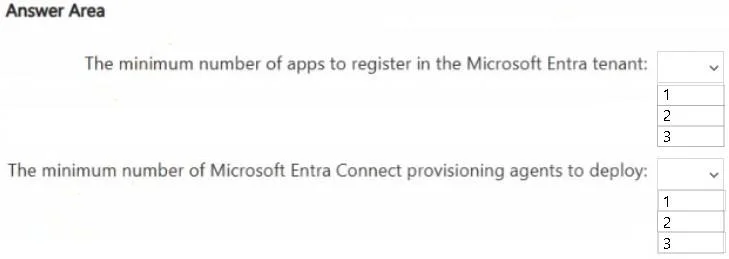
Hotspot Question Your on-premises network contains an Active Directory Domain Services (AD DS) forest. The forest contains a top-level domain, three child domains, and an on-premises server named…
Explanation Dropdown 1: Minimum number of apps to register in the Microsoft Entra tenant Correct Answer: 2 Why 2 is correct: Workday inbound provisioning requires one enterprise app per destination system: App 1 - "Workday to Active Directory User Provisioning": Provisions new…
Question
Exhibit
Answer Area
- The minimum number of apps to register in the Microsoft Entra tenant:123
- The minimum number of Microsoft Entra Connect provisioning agents to deploy:123
Explanation
Explanation
Dropdown 1: Minimum number of apps to register in the Microsoft Entra tenant
Correct Answer: 2
Why 2 is correct:
Workday inbound provisioning requires one enterprise app per destination system:
- App 1 - "Workday to Active Directory User Provisioning": Provisions new users into the targeted on-premises child domain. This app uses a provisioning agent to reach on-premises AD.
- App 2 - "Workday to Microsoft Entra ID User Provisioning": Provisions new users directly into the Entra tenant (cloud-to-cloud, no agent needed).
The distinct employee vs. contractor provisioning logic does not force additional apps. Within a single provisioning app, you can use:
- Scoping filters to separate employees from contractors
- IIF (conditional) expressions in attribute mappings to apply different transformation logic per user type
So both user types can be handled within each of the 2 apps. Creating 4 apps (one per user type per destination) would work but violates the minimum-effort constraint.
- Why 1 is wrong: You need separate apps for each distinct destination system (on-premises AD and Entra ID). A single app cannot target both.
- Why 3 is wrong: No third destination exists. The distinct logic between user types is handled via expressions/scoping within the existing 2 apps - not by adding a third app.
Dropdown 2: Minimum number of Microsoft Entra Connect provisioning agents to deploy
Correct Answer: 1
Why 1 is correct:
The Microsoft Entra Connect provisioning agent (a lightweight on-premises agent, distinct from the older Connect Sync) is required to bridge between the Entra cloud service and on-premises AD for Workday inbound provisioning. Key facts:
-
Only one child domain is the target - one agent can serve that domain.
-
A single provisioning agent can serve multiple provisioning apps targeting the same domain (employees app and contractors app would both route through the same agent).
-
The existing Server1 (Entra Connect Sync) already handles replication of all 3 child domains -> Entra tenant. The new provisioning agent is only needed for the Workday -> on-premises AD flow.
-
Why 2 is wrong: Two agents would be needed if you were targeting two separate child domains, or for high-availability redundancy - but the scenario specifies one child domain and asks for the minimum.
-
Why 3 is wrong: Three agents would correspond to all three child domains. The scenario explicitly states provisioning targets only one child domain.
Key Technical Concepts
| Concept | Detail |
|---|---|
| Workday inbound provisioning | Uses Entra enterprise apps (gallery apps) configured per destination |
| Provisioning agent | Lightweight on-premises service that allows Entra cloud to write to on-premises AD |
| Entra Connect Sync vs. Provisioning Agent | Sync (Server1) = reads AD -> pushes to Entra. Provisioning Agent = allows Entra -> writes to AD |
| Scoping filters / IIF expressions | Mechanism to encode distinct logic within a single app, avoiding app proliferation |
Topics
Community Discussion
No community discussion yet for this question.