
AZ-305 · Question #411
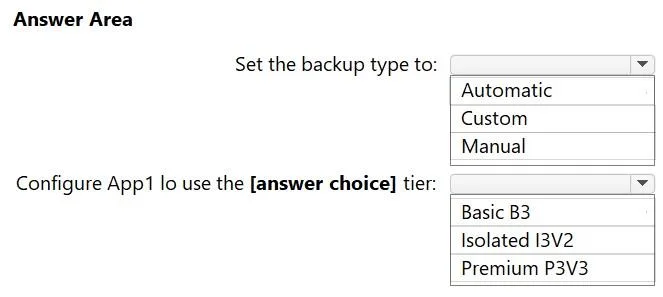
Hotspot Question You have an Azure subscription that contains an Azure App Service app named ASP1. ASP1 uses the Basic B1 tier and hosts an app named App1. You need to create a backup solution for…
Azure App Service Backup - Hotspot Explanation --- Dropdown 1: Set the backup type to -> Custom Why Custom is correct: Custom backups in Azure App Service are user-configured scheduled backups. They support: Scheduled execution (hourly intervals are supported) Individual…
Question
Exhibit
Answer Area
- Set the backup type to:AutomaticCustomManual
- Configure App1 lo use the [answer choice] tier:Basic B3Isolated I3V2Premium P3V3
Explanation
Azure App Service Backup - Hotspot Explanation
Dropdown 1: Set the backup type to -> Custom
Why Custom is correct: Custom backups in Azure App Service are user-configured scheduled backups. They support:
- Scheduled execution (hourly intervals are supported)
- Individual download - stored in an Azure Storage account you own, so each backup file is directly downloadable
- Deployment slot coverage - you can configure custom backups per slot
Why the alternatives are wrong:
| Option | Why Wrong |
|---|---|
| Automatic | Azure-managed automatic backups run every hour but are not downloadable - they exist only for internal restore operations and do not cover deployment slots |
| Manual | Requires a human to trigger each backup; cannot satisfy "once every hour" without constant admin effort, violating the minimize-effort requirement |
Key concept: Custom (scheduled) backups require a connected Azure Storage Account and a tier that supports the feature (Standard or higher).
Dropdown 2: Configure App1 to use the -> Premium P3V3 tier
Why Premium P3V3 is correct: The current Basic B1 tier does not support custom scheduled backups or deployment slots - both are hard blockers. The requirements need:
- Custom backup support -> requires Standard tier or above
- Deployment slots -> requires Standard tier or above
Among the three options, Premium P3V3 is the lowest-cost option that satisfies both requirements, minimizing cost while meeting all constraints.
Why the alternatives are wrong:
| Option | Why Wrong |
|---|---|
| Basic B3 | Still the Basic tier - scaling up the instance size within Basic does not unlock deployment slots or custom backup scheduling; these are tier-level features, not instance-size features |
| Isolated I3V2 | Isolated tier runs in a dedicated environment (App Service Environment) - far more expensive and operationally complex than needed; violates the minimize-cost requirement |
Key concept: Azure App Service features like scheduled backups and deployment slots are gated by pricing tier, not instance size. Moving from Basic B1 -> Basic B3 is a vertical scale within the same tier and unlocks nothing new. You must move to Standard or Premium tier to get these features.
Topics
Community Discussion
No community discussion yet for this question.