
Microsoft
AZ-305 · Question #190
Hotspot Question You plan to migrate on-premises Microsoft SQL Server databases to Azure. You need to recommend a deployment and resiliency solution that meets the following requirements: - Supports…
Dropdown 1: Deployment Solution - Azure SQL Managed Instance Why Azure SQL Managed Instance is correct Migration compatibility: Provides near-100% SQL Server compatibility, making it the ideal lift-and-shift target from on-premises SQL Server (supports SQL Agent, CLR, linked…
Submitted by carlos_mx· Mar 6, 2026Design business continuity solutions
Question
Hotspot Question You plan to migrate on-premises Microsoft SQL Server databases to Azure. You need to recommend a deployment and resiliency solution that meets the following requirements: - Supports user-initiated backups - Supports multiple automatically replicated instances across Azure regions - Minimizes administrative effort to implement and maintain business continuity What should you recommendation? To answer, select the appropriate options in the answer area. NOTE: Each correct selection is worth one point. Answer:
Exhibits
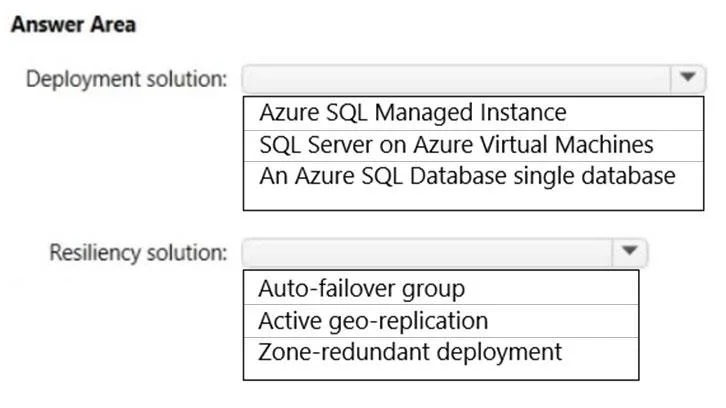
Answer Area
- Deployment solution:Azure SQL Managed InstanceSQL Server on Azure Virtual MachinesAn Azure SQL Database single database
- Resiliency solution:Auto-failover groupActive geo-replicationZone-redundant deployment
Explanation
Dropdown 1: Deployment Solution - Azure SQL Managed Instance
Why Azure SQL Managed Instance is correct
- Migration compatibility: Provides near-100% SQL Server compatibility, making it the ideal lift-and-shift target from on-premises SQL Server (supports SQL Agent, CLR, linked servers, etc.)
- User-initiated backups: Supports copy-only backups to Azure Blob Storage on demand - a feature not available on Azure SQL Database
- Managed PaaS: Fully managed service with automated patching, monitoring, and HA built in - minimizes administrative overhead
Why the alternatives are wrong
| Option | Why it's wrong |
|---|---|
| SQL Server on Azure VMs | IaaS - you manage the OS, SQL patches, HA configuration yourself. High admin effort, violates the "minimize administrative effort" requirement |
| Azure SQL Database (single) | Does not support user-initiated copy-only backups (automated backups only). Also has more feature gaps vs. on-premises SQL Server |
Dropdown 2: Resiliency Solution - Auto-failover group
Why Auto-failover group is correct
- Cross-region replication: Automatically replicates data to a secondary instance in a different Azure region
- Automatic failover: Can be configured to fail over without manual intervention, minimizing administrative effort
- Managed Instance support: Auto-failover groups are the only cross-region HA option supported by Azure SQL Managed Instance
- Group semantics: Manages multiple databases as a single unit with one connection string endpoint - simplifies app configuration
Why the alternatives are wrong
| Option | Why it's wrong |
|---|---|
| Active geo-replication | Only supported for Azure SQL Database (single databases/elastic pools) - not supported for Azure SQL Managed Instance. Also requires manual failover |
| Zone-redundant deployment | Replicates across Availability Zones within a single region - does not meet the "across Azure regions" requirement |
Key Concept Summary
The pairing Azure SQL Managed Instance + Auto-failover groups is the canonical answer for: migrating on-premises SQL Server workloads with minimal admin effort, cross-region HA, and user-initiated backup support. Active geo-replication is a common distractor but is fundamentally incompatible with Managed Instance.
Topics
#Azure SQL Managed Instance#Auto-failover groups#Database migration#Business continuity
Community Discussion
No community discussion yet for this question.