
AZ-305 · Question #362
You have an Azure subscription that contains an Azure App Service app named App1 in a Standard App Service plan. App1 is accessed directly from the internet by using the following URL…
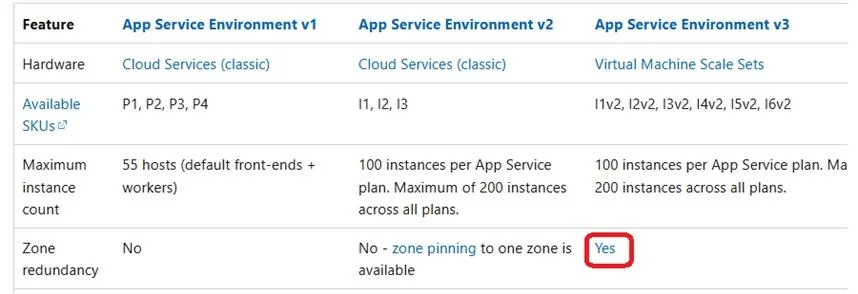
The correct answer is A. Create an App Service Environment v3. Redeploy App1. App Service Environment v3 supports Zone redundancy. Three zones is used within a region. Note: App Service, Web Apps, App Service Environment version comparison App Service Environment has three versions. App Service Environment v3 is the latest version and provides advantages…
Question
Exhibit
Options
- ACreate an App Service Environment v3. Redeploy App1.
- BScale out the existing App1 App Service instance to three instances.
- CCreate a new Premium v3 App Service plan. Redeploy App1.
- DScale up the existing App Service plan for App1 to the Premium v3 tier.
How the community answered
(18 responses)- A67% (12)
- B6% (1)
- C17% (3)
- D11% (2)
Explanation
App Service Environment v3 supports Zone redundancy. Three zones is used within a region. Note: App Service, Web Apps, App Service Environment version comparison App Service Environment has three versions. App Service Environment v3 is the latest version and provides advantages and feature differences over earlier versions. App Service Environment v1 and v2 will be retired on 31 August 2024. After that date, those versions will no longer be supported and any remaining App Service Environment v1 and v2s and the applications running on them will be deleted. There's a new version of App Service Environment that is easier to use and runs on more powerful infrastructure. To learn more about the new version, start with the Introduction to the App Service Environment. If you're currently using App Service Environment v1 or v2, please follow the steps in this article to migrate to the new version. Comparison between versions https://learn.microsoft.com/en-us/azure/app-service/environment/version-comparison
Community Discussion
No community discussion yet for this question.