
AZ-305 · Question #354
You have an on-premises Microsoft SQL Server 2016 database named DB1. You have an Azure subscription. You need to migrate DB1 to an Azure SQL database by using the Azure SQL Migration extension for…
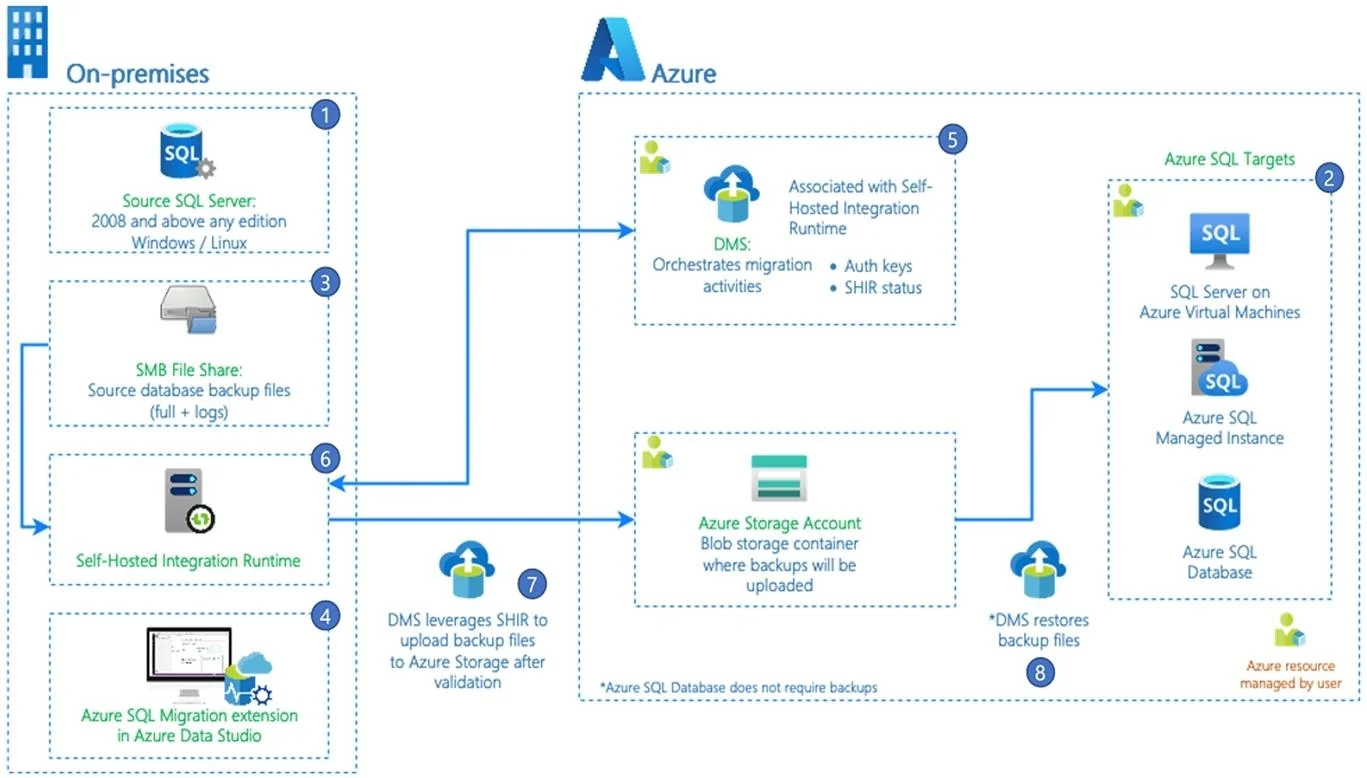
The correct answer is B. Define the schema for the Azure SQL database. The Azure SQL migration extension for Azure Data Studio If your target is Azure SQL Database, make sure you deploy the database schema before you begin the migration Note: The Azure SQL migration extension for Azure Data Studio enables you to assess, get right- sized Azure…
Question
Exhibit
Options
- AConfigure a Site-to-Site (S2S) VPN connection.
- BDefine the schema for the Azure SQL database.
- CCreate a user-assigned managed identity.
- DUpgrade DB1.
How the community answered
(28 responses)- A18% (5)
- B71% (20)
- C7% (2)
- D4% (1)
Explanation
The Azure SQL migration extension for Azure Data Studio If your target is Azure SQL Database, make sure you deploy the database schema before you begin the migration Note: The Azure SQL migration extension for Azure Data Studio enables you to assess, get right- sized Azure recommendations and migrate your SQL Server databases to Azure. The workflow of the migration process is illustrated in the following diagram: https://learn.microsoft.com/en-us/azure-data-studio/extensions/azure-sql-migration-extension https://learn.microsoft.com/en-us/azure/dms/migration-using-azure-data-studio
Community Discussion
No community discussion yet for this question.