
AZ-305 · Question #353
Hotspot Question You have 100 Azure Storage accounts. Access to the accounts is restricted by using Azure role-based access control (Azure RBAC) assignments. You need to recommend a solution that…
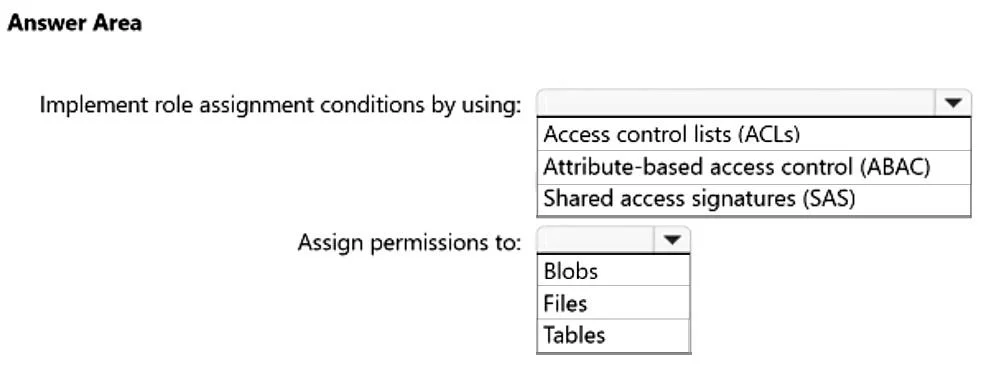
The correct answer is Implement role assignment conditions by using:: Attribute-based access control (ABAC); Assign permissions to:: Blobs. This question tests knowledge of Azure RBAC attribute-based access control (ABAC) conditions, specifically how to use resource tags as conditions in role assignments to provide fine-grained access control to Azure Storage resources.
Question
Exhibit
Answer Area
- Implement role assignment conditions by using:Attribute-based access control (ABAC)Access control lists (ACLs)Attribute-based access control (ABAC)Shared access signatures (SAS)
- Assign permissions to:BlobsBlobsFilesTables
Explanation
This question tests knowledge of Azure RBAC attribute-based access control (ABAC) conditions, specifically how to use resource tags as conditions in role assignments to provide fine-grained access control to Azure Storage resources.
Approach. To implement role assignment conditions based on tags assigned to individual resources within storage accounts, you should use Azure Attribute-Based Access Control (ABAC), which is an extension of Azure RBAC. You need to add conditions to role assignments using the 'Resource attribute' condition type, specifically targeting resource tags (e.g., @Resource[Microsoft.Storage/storageAccounts/blobServices/containers:tags] or blob index tags). The condition editor in the Azure portal (or ARM/Bicep templates) allows you to define conditions such as 'Allow access only if the blob's index tag matches a specific key-value pair' - for example, granting a user access to blobs where the tag 'Project' equals 'Alpha'. This requires using supported roles like Storage Blob Data Reader/Contributor/Owner and leveraging the condition version 2.0 format. For storage account-level resource tags, you use the 'Environment' attribute from the principal or resource context within the ABAC condition expression.
Concept tested. Azure RBAC Attribute-Based Access Control (ABAC) - specifically, adding role assignment conditions that evaluate resource tags (blob index tags or resource tags) to provide fine-grained, attribute-based authorization beyond standard RBAC role assignments on Azure Storage accounts.
Reference. https://learn.microsoft.com/en-us/azure/role-based-access-control/conditions-overview
Topics
Community Discussion
No community discussion yet for this question.