
AZ-305 · Question #338
Hotspot Question You have an Azure subscription. You create a storage account that will store documents. You need to configure the storage account to meet the following requirements: - Ensure that…
The correct answer is Enable operational backup with Azure Backup = No; Enable point-in-time restore for containers = No; Enable soft delete for blobs = No; Enable soft delete for containers = No; Enable permanent delete for soft deleted items = Yes; Enable versioning for blobs = No; Enable blob change feed = No; Enable version-level immutability support = Yes. Azure Storage Account - Exam Explanation The Two Requirements | # | Requirement | Answer | |---|-------------|--------| | A | Standardize retention policies across the subscription | Enable version-level immutability support | | B | Purge data if copied to an unauthorized…
Question
Exhibit
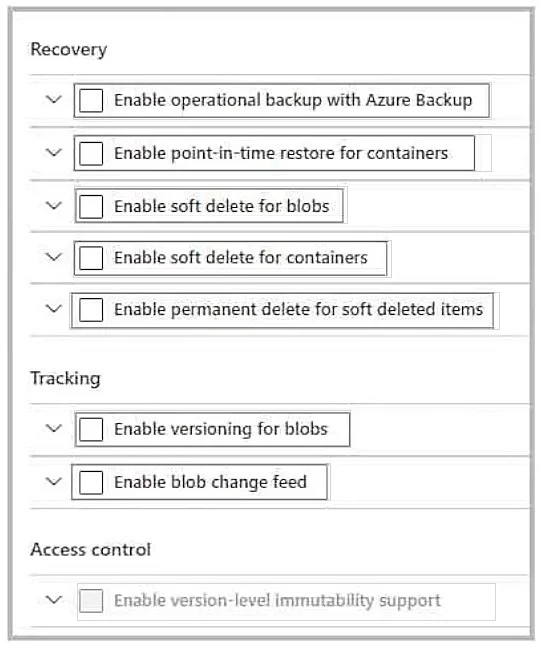
Answer Area
- Enable operational backup with Azure BackupNo
- Enable point-in-time restore for containersNo
- Enable soft delete for blobsNo
- Enable soft delete for containersNo
- Enable permanent delete for soft deleted itemsYes
- Enable versioning for blobsNo
- Enable blob change feedNo
- Enable version-level immutability supportYes
Explanation
Azure Storage Account - Exam Explanation
The Two Requirements
| # | Requirement | Answer |
|---|---|---|
| A | Standardize retention policies across the subscription | Enable version-level immutability support |
| B | Purge data if copied to an unauthorized location | Enable permanent delete for soft deleted items |
Statement-by-Statement Breakdown
1. Enable operational backup with Azure Backup -> No Azure Backup provides point-in-time recovery for blob data. It's a disaster recovery tool, not a policy governance tool. It doesn't standardize retention policies at the subscription level, nor does it enable data purging.
2. Enable point-in-time restore for containers -> No Point-in-time restore lets you revert container contents to an earlier state. Again, this is a recovery feature - it actually works against purging data, since it restores deleted data.
3. Enable soft delete for blobs -> No Soft delete retains deleted blobs for a configurable period. This prevents immediate purging - the opposite of what requirement B needs. It also doesn't standardize policies subscription-wide.
4. Enable soft delete for containers -> No Same reasoning as soft delete for blobs, just at the container level. Protects against accidental deletion but doesn't address either requirement.
5. Enable permanent delete for soft deleted items -> YES
Addresses: "data can be purged if copied to an unauthorized location"
When soft delete is active, deleted blobs enter a recoverable state and cannot be immediately purged. Enabling permanent delete allows you to bypass the soft-delete retention window and truly erase the data. This is critical when sensitive data must be irreversibly removed.
6. Enable versioning for blobs -> No Versioning preserves every prior version of a blob automatically. Like soft delete, it makes data harder to purge, not easier. Not related to subscription-wide policy standardization.
7. Enable blob change feed -> No Change feed provides a transaction log (audit trail) of blob create/update/delete events. It's an observability tool - useful for compliance auditing but does not configure any retention policy.
8. Enable version-level immutability support -> YES
Addresses: "retention policies are standardized across the subscription"
Version-level immutability allows you to apply WORM (Write Once, Read Many) time-based retention policies or legal holds at the individual blob version level. The key governance integration: these immutability policies can be enforced and standardized across your entire Azure subscription via Azure Policy, ensuring no storage account deviates from the defined retention rules.
Memory Tips
| Concept | Remember As |
|---|---|
| Version-level immutability | "Lock it subscription-wide" - works with Azure Policy for governance |
| Permanent delete | "Override soft delete" - the only way to truly purge when soft delete is on |
| Soft delete / versioning | "Undo buttons" - they protect data, never purge it |
| Point-in-time restore | "Time machine" - recovery only, not governance |
| Change feed | "Audit log" - observe changes, don't control them |
Quick Rule
- Policy/governance at scale -> Immutability (version-level)
- Need to truly erase data -> Permanent delete (bypasses soft delete)
Topics
Community Discussion
No community discussion yet for this question.