
AZ-305 · Question #446
Hotspot Question You have an on-premises app named App1 that reads data from a table named Table1, writes new data to Table1, and scans Table1 for aggregate statistics. App1 uses hard-coded…
This question tests knowledge of Azure data storage services and their migration considerations when moving an on-premises table-based application to Azure, balancing scalability/performance with development effort.
Question
Exhibits
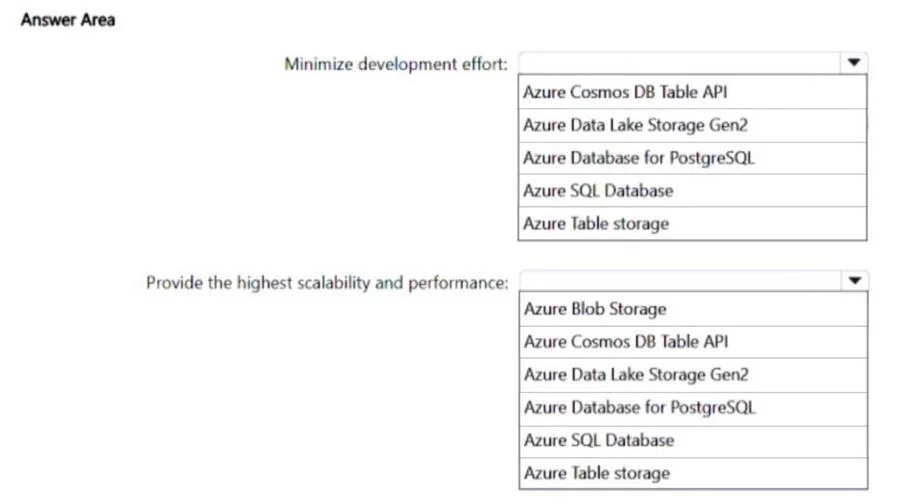
Answer Area
- Minimize development effort:Azure Cosmos DB Table APIAzure Data Lake Storage Gen2Azure Database for PostgreSQLAzure SQL DatabaseAzure Table storage
- Provide the highest scalability and performance:Azure Blob StorageAzure Cosmos DB Table APIAzure Data Lake Storage Gen2Azure Database for PostgreSQLAzure SQL DatabaseAzure Table storage
Explanation
This question tests knowledge of Azure data storage services and their migration considerations when moving an on-premises table-based application to Azure, balancing scalability/performance with development effort.
Approach. For highest scalability and performance, Azure Cosmos DB (specifically the Table API) is the correct choice because it offers global distribution, multi-master replication, guaranteed single-digit millisecond latency, and virtually unlimited throughput - far exceeding Azure Table Storage capabilities. For minimizing development effort, Azure Table Storage is the correct choice because App1 already uses hard-coded partition keys compatible with the Azure Table Storage API, meaning the migration requires minimal or no code changes since the SDKs and data model are nearly identical to on-premises Table Storage. The Cosmos DB Table API also minimizes development effort compared to switching to a completely different data model, but between the two options presented, Azure Table Storage requires the least code change for an app already designed around table-style partition key access patterns. The key tradeoff is: Cosmos DB Table API for best performance/scalability, Azure Table Storage for least development effort given the existing hard-coded partition key design.
Concept tested. Understanding the differences between Azure Table Storage and Azure Cosmos DB Table API - including when to use each based on scalability, performance, and migration effort - and how hard-coded partition keys affect the recommendation for minimizing development effort during cloud migration.
Reference. https://learn.microsoft.com/en-us/azure/cosmos-db/table/introduction
Topics
Community Discussion
No community discussion yet for this question.