
AZ-305 · Question #327
Hotspot Question You have an Azure subscription. You plan to deploy five storage accounts that will store block blobs and five storage accounts that will host file shares. The file shares will be…
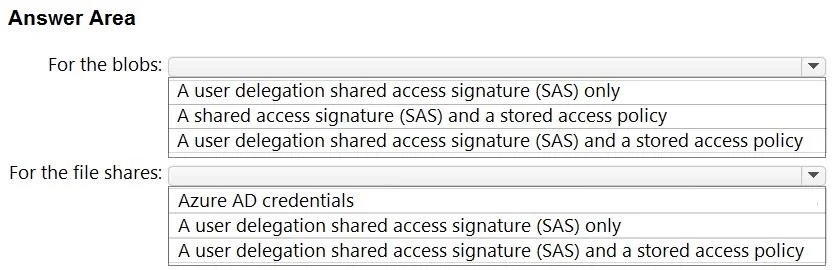
The correct answer is For the blobs:: A user delegation shared access signature (SAS) and a stored access policy; For the file shares:: Azure AD credentials. This hotspot question tests knowledge of Azure Storage access authorization methods for block blobs and SMB file shares, focusing on maximizing security, preventing shared key access, and supporting time-limited access.
Question
Exhibit
Answer Area
- For the blobs:A user delegation shared access signature (SAS) and a stored access policyA user delegation shared access signature (SAS) onlyA shared access signature (SAS) and a stored access policyA user delegation shared access signature (SAS) and a stored access policy
- For the file shares:Azure AD credentialsAzure AD credentialsA user delegation shared access signature (SAS) onlyA user delegation shared access signature (SAS) and a stored access policy
Explanation
This hotspot question tests knowledge of Azure Storage access authorization methods for block blobs and SMB file shares, focusing on maximizing security, preventing shared key access, and supporting time-limited access.
Approach. For block blob storage accounts: Use Azure AD (Entra ID) with SAS tokens (User Delegation SAS). User Delegation SAS tokens are secured with Azure AD credentials instead of shared keys, support time-limited access, and provide the highest security for blob storage - satisfying all three requirements. For SMB file shares: Use Azure AD Kerberos (Azure AD DS or on-premises AD DS integration) for identity-based authentication. Since SMB file shares cannot use SAS tokens or User Delegation SAS, Azure AD Kerberos authentication prevents shared key usage and maximizes security. Note that SMB file shares with AD authentication do not natively support time-limited access via SAS, so 'whenever possible' acknowledges this limitation. To explicitly prevent shared key use, enable the 'Allow storage account key access = Disabled' setting at the storage account level (allowSharedKeyAccess = false), which forces Azure AD-only authentication and blocks shared key and SAS (account-level) access.
Concept tested. Azure Storage access authorization methods including User Delegation SAS for blobs (Azure AD-backed, time-limited, no shared key), Azure AD Kerberos/AD DS for SMB file shares, and the allowSharedKeyAccess=false policy to enforce shared key prevention across storage accounts.
Reference. https://learn.microsoft.com/en-us/azure/storage/blobs/authorize-access-azure-active-directory | https://learn.microsoft.com/en-us/azure/storage/files/storage-files-identity-auth-azure-active-directory-enable
Topics
Community Discussion
No community discussion yet for this question.