
AZ-305 · Question #326
Hotspot Question You have an Azure subscription that contains multiple storage accounts. You assign Azure Policy definitions to the storage accounts. You need to recommend a solution to meet the…
The correct answer is To trigger the compliance scans, use:: The Azure Command-Line Interface (CLI); To generate the non-compliance alerts, configure diagnostic settings for the:: Azure activity logs. This question tests knowledge of how to trigger on-demand Azure Policy compliance scans and how to set up Azure Monitor alerts based on Log Analytics queries for non-compliance events.
Question
Exhibit
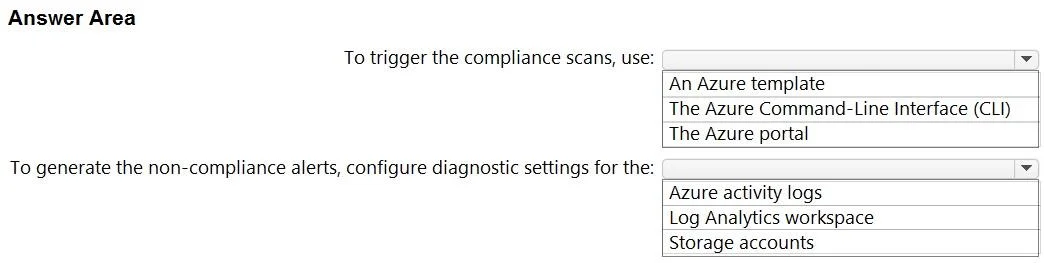
Answer Area
- To trigger the compliance scans, use:The Azure Command-Line Interface (CLI)An Azure templateThe Azure Command-Line Interface (CLI)The Azure portal
- To generate the non-compliance alerts, configure diagnostic settings for the:Azure activity logsAzure activity logsLog Analytics workspaceStorage accounts
Explanation
This question tests knowledge of how to trigger on-demand Azure Policy compliance scans and how to set up Azure Monitor alerts based on Log Analytics queries for non-compliance events.
Approach. For triggering on-demand Azure Policy compliance scans, the correct recommendation is to use Azure PowerShell (specifically 'Start-AzPolicyComplianceScan') or Azure CLI, as these allow you to initiate a compliance evaluation scan outside the standard 24-hour cycle. For raising Azure Monitor non-compliance alerts by querying logs collected by Log Analytics, the correct recommendation is to use Azure Monitor Log Alert rules (also known as 'Log search alerts'), which allow you to write KQL queries against the AzureActivity or AzurePolicyAssignmentsMigratedFromV0 logs in Log Analytics and trigger alerts when non-compliant resources are detected. Azure Policy writes compliance state changes to Log Analytics when diagnostic settings are configured, enabling this log-based alerting approach.
Concept tested. Azure Policy compliance management - specifically on-demand compliance scan triggering via PowerShell/CLI and configuring Azure Monitor Log Alert rules backed by Log Analytics KQL queries to alert on non-compliant policy states.
Reference. https://learn.microsoft.com/en-us/azure/governance/policy/how-to/get-compliance-data#on-demand-evaluation-scan and https://learn.microsoft.com/en-us/azure/azure-monitor/alerts/alerts-log
Topics
Community Discussion
No community discussion yet for this question.