
AZ-305 · Question #309
Hotspot Question You have two on-premises Microsoft SQL Server 2017 instances that host an Always On availability group named AG1. AG1 contains a single database named DB1. You have an Azure…
The correct answer is Prepare for the migration by:: Adding a secondary replica to AG1; Perform the migration by using:: Azure Migrate. This question tests knowledge of migrating a SQL Server database from an on-premises Always On availability group to a SQL Server instance on an Azure Linux VM with minimal downtime. The key challenge is cross-platform migration (Windows SQL Server 2017 to Linux SQL Server…
Question
Exhibit
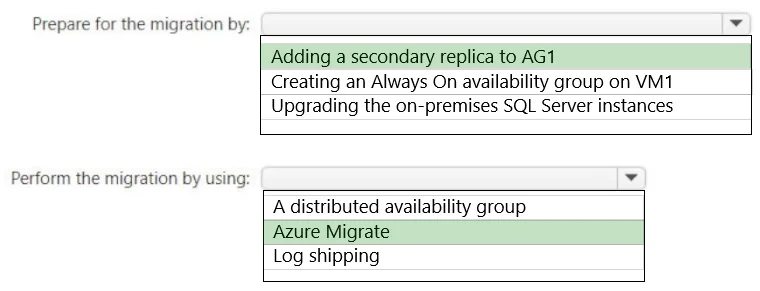
Answer Area
- Prepare for the migration by:Adding a secondary replica to AG1Adding a secondary replica to AG1Creating an Always On availability group on VM1Upgrading the on-premises SQL Server instances
- Perform the migration by using:Azure MigrateA distributed availability groupAzure MigrateLog shipping
Explanation
This question tests knowledge of migrating a SQL Server database from an on-premises Always On availability group to a SQL Server instance on an Azure Linux VM with minimal downtime. The key challenge is cross-platform migration (Windows SQL Server 2017 to Linux SQL Server 2019) while keeping DB1 online as long as possible.
Approach. To minimize downtime, you should use log shipping or backup/restore with transaction log tail-log backup as the final cutover step. The correct approach is: (1) Take a full backup of DB1 from the secondary replica of AG1 (to avoid impacting the primary), (2) Restore the full backup and subsequent transaction log backups on VM1 (SQL Server 2019 on Linux) using the NORECOVERY option, (3) Continue applying transaction log backups to keep VM1 in sync, and (4) Perform a final tail-log backup on the primary, apply it to VM1 with RECOVERY to bring the database online, then redirect applications to VM1. This approach leverages the secondary replica for backups to reduce primary impact, uses log shipping-style restore to minimize the downtime window to only the tail-log backup and cutover period, and is supported because SQL Server backup/restore is compatible across Windows and Linux between SQL Server 2017 and 2019.
Concept tested. Cross-platform SQL Server migration using backup and restore with transaction log shipping to minimize downtime, specifically migrating from a Windows-based Always On availability group (SQL Server 2017) to a Linux-based SQL Server 2019 instance on Azure VM. Key concepts include: using secondary replicas for backups, NORECOVERY restore mode for log shipping, tail-log backup for final cutover, and cross-platform compatibility of SQL Server backup files.
Topics
Community Discussion
No community discussion yet for this question.