
Microsoft
AZ-120 · Question #84
Drag and Drop Question You have an on-premises SAP environment that runs on SUSE Linux Enterprise Server (SLES) servers and Oracle. The version of the SAP ERP system is 6.06 and the version of the…
Sign in or unlock AZ-120 to reveal the answer and full explanation for question #84. The question stem and answer options stay visible for context.
Migrate SAP workloads to Azure
Question
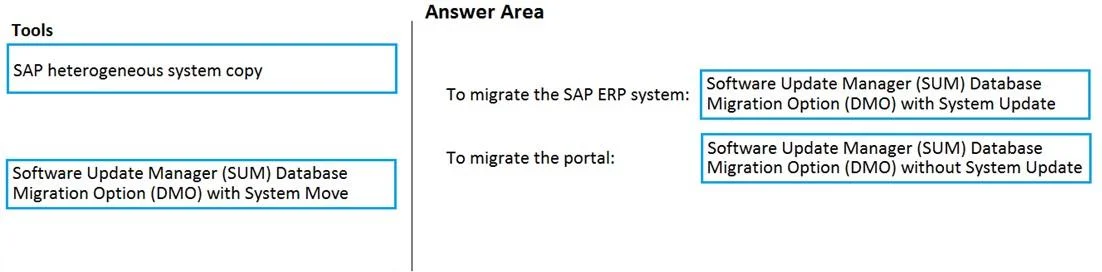
Drag and Drop Question You have an on-premises SAP environment that runs on SUSE Linux Enterprise Server (SLES) servers and Oracle. The version of the SAP ERP system is 6.06 and the version of the portal is SAP NetWeaver 7.3. You need to recommend a migration strategy to migrate the SAP ERP system and the portal to Azure. The solution must be hosted on SAP HANA. What should you recommend? To answer, drag the appropriate tools to the correct components. Each tool may be used once, more than once, or not at all. You may need to drag the split bar between panes or scroll to view content. NOTE: Each correct selection is worth one point. Answer:
Exhibit
Answer Area
Drag items
SAP heterogeneous system copySoftware Update Manager (SUM) Database Migration Option (DMO) with System UpdateSoftware Update Manager (SUM) Database Migration Option (DMO) without System Update
Unlock AZ-120 to see the answer
You've previewed enough free AZ-120 questions. Unlock AZ-120 for full answers, explanations, the timed quiz mode, progress tracking, and the master PDF. Question stem and options stay visible so you can still see what's on the exam.
Topics
#SUM DMO#Oracle to HANA migration#heterogeneous system copy#SAP ERP migration