nerdexam
Microsoft

AZ-120 · Question #82

Drag and Drop Question You deploy an SAP environment on Azure. You need to grant an SAP administrator read-only access to the Azure subscription. The SAP administrator must be prevented from viewing…

The correct answer is */read; Microsoft.Network/*/read. Azure RBAC Custom Role - Read-Only with Network Exclusion The Two Targets This question is configuring a custom RBAC role definition. The two drop targets represent: | Target | Field | Purpose | |--------|-------|---------| | 1 | Actions | What the role is allowed to do | | 2 |…

Design and implement an infrastructure to support SAP workloads on Azure

Question

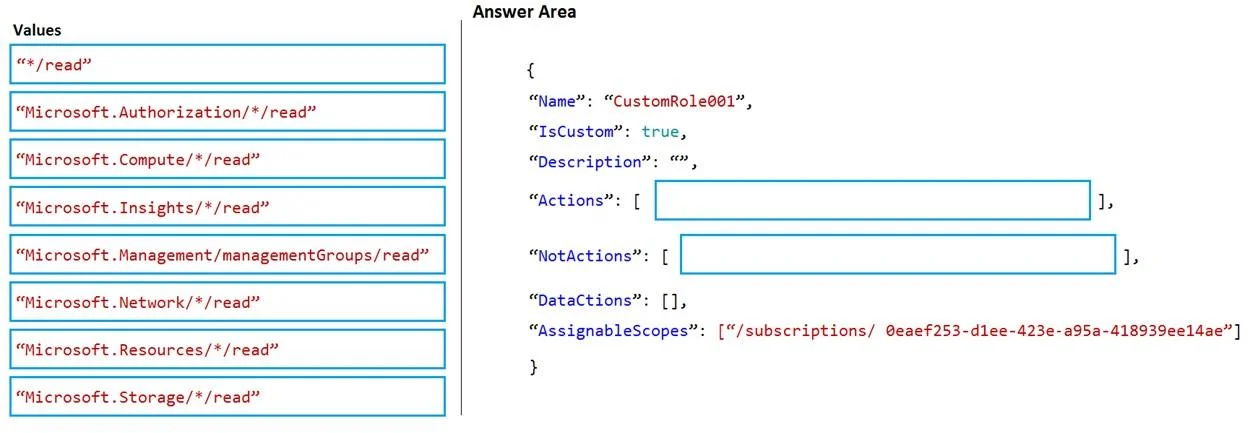
Drag and Drop Question You deploy an SAP environment on Azure. You need to grant an SAP administrator read-only access to the Azure subscription. The SAP administrator must be prevented from viewing network information. How should you configure the role-based access control (RBAC) role definition? To answer, drag the appropriate values to the correct targets. Each value may be used once, more than once, or not at all. You may need to drag the split bar between panes or scroll to view content. NOTE: Each correct selection is worth one point. Answer:

Exhibit
AZ-120 question #82 exhibit

Answer Area

Drag items

Microsoft.Authorization/*/readMicrosoft.Compute/*/readMicrosoft.Insights/*/readMicrosoft.Management/managementGroups/*/readMicrosoft.Network/*/readMicrosoft.Resources/*/readMicrosoft.Storage/*/read*/read

Correct arrangement

  • */read
  • Microsoft.Network/*/read

Explanation

Azure RBAC Custom Role - Read-Only with Network Exclusion

The Two Targets

This question is configuring a custom RBAC role definition. The two drop targets represent:

TargetFieldPurpose
1ActionsWhat the role is allowed to do
2NotActionsWhat is excluded from those allowed actions

Why Each Item Goes Where It Does

Target 1 (Actions): */read

The wildcard */read grants read-only access to every resource provider across the entire Azure subscription - compute, storage, insights, resources, network, etc. This satisfies the "read-only access to the subscription" requirement in a single, clean expression.

Why not list them individually (e.g., Microsoft.Compute/*/read, Microsoft.Storage/*/read)? You could, but */read is the correct and efficient approach. Listing individual providers would also fail to cover future resource providers automatically.

Target 2 (NotActions): Microsoft.Network/*/read

NotActions does not grant deny permissions - it subtracts actions from whatever Actions granted. Placing Microsoft.Network/*/read here removes all network read permissions that */read would have otherwise included.

This means: "Read everything, except anything under Microsoft.Network."


Common Mistakes & Misconceptions

  • Confusing NotActions with explicit Deny: NotActions is a subtraction from Actions, not a hard deny. A separate role assignment with Microsoft.Network/*/read in its Actions could still override this. For a true deny, you'd use Azure deny assignments (a different concept).

  • Putting Microsoft.Network/*/read in Actions: This would grant network read access - the opposite of what's needed.

  • Using */read in NotActions: This would subtract everything that was granted, leaving the role with no effective permissions.

  • Listing individual providers instead of */read: If you listed Microsoft.Compute/*/read, Microsoft.Storage/*/read, etc. individually in Actions but omitted network, that technically works but is fragile and not the intended answer here.


Summary

{
  "Actions": [ "*/read" ],
  "NotActions": [ "Microsoft.Network/*/read" ]
}

Grant everything readable, then punch out network visibility - clean, minimal, and correct.

Topics

#RBAC role definition#read-only access#notActions#network permission exclusion

Community Discussion

No community discussion yet for this question.

Full AZ-120 Practice