
AZ-104 · Question #821
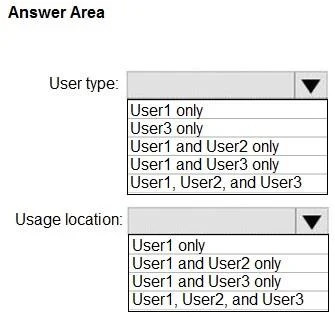
Hotspot Question You have a Microsoft Entra tenant that contains the users shown in the following table. For which users can you modify the User type and Usage location settings? To answer, select…
In Microsoft Entra ID, core identity attributes like User type cannot be modified in the cloud for on-premises synced users, whereas cloud-specific properties like Usage location can be updated for all users.
Question
Exhibit
Answer Area
- User type:User1 onlyUser3 onlyUser1 and User2 onlyUser1 and User3 onlyUser1, User2, and User3
- Usage location:User1 onlyUser1 and User2 onlyUser1 and User3 onlyUser1, User2, and User3
Explanation
In Microsoft Entra ID, core identity attributes like User type cannot be modified in the cloud for on-premises synced users, whereas cloud-specific properties like Usage location can be updated for all users.
Approach. Select 'User1 and User3 only' for User type. Cloud-only users (User1) and Guest users (User3) have their Source of Authority in Microsoft Entra ID, meaning their 'User type' (Member or Guest) can be modified directly in the Azure portal. User2 is synced from on-premises Active Directory, so core identity attributes are read-only in the cloud and must be managed on-premises. Select 'User1, User2, and User3' for Usage location. The 'Usage location' attribute is mandatory for assigning Microsoft 365 licenses and is a cloud-specific setting. It can be modified directly in Entra ID for all users, including those synced from on-premises.
Common mistakes.
- common_mistake. A common mistake is assuming that because a user is synced from on-premises (User2), none of their attributes can be edited in the cloud, leading to the incorrect exclusion of User2 from the Usage location answer. Conversely, users might mistakenly believe they can change the User type of a synced user directly in the Entra portal.
Concept tested. Microsoft Entra ID Attribute Authority, Directory Synchronization (Entra Connect), and User Licensing requirements.
Reference. https://learn.microsoft.com/en-us/entra/fundamentals/users-default-permissions
Topics
Community Discussion
No community discussion yet for this question.