
AZ-104 · Question #820
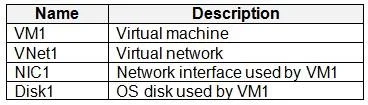
You have an Azure subscription that contains two resource groups named RG1 and RG2. RG1 contains the resources shown in the following table. You move VM1 to RG2. Which resources are in RG2 after the…
The correct answer is C. VM1, NIC1, and Disk1 only. When an Azure Virtual Machine is moved to a new resource group, its directly associated resources like managed disks and network interfaces are also moved, but the virtual network itself is not.
Question
Exhibits
Options
- AVM1 only
- BVM1 and Disk1 only
- CVM1, NIC1, and Disk1 only
- DVM1, VNet1, NIC1, and Disk1
How the community answered
(20 responses)- A5% (1)
- B5% (1)
- C80% (16)
- D10% (2)
Why each option
When an Azure Virtual Machine is moved to a new resource group, its directly associated resources like managed disks and network interfaces are also moved, but the virtual network itself is not.
A virtual machine cannot exist without its associated managed disk and network interface, so moving only VM1 is not a valid outcome; its dependencies are moved too.
This is incorrect because the Network Interface Card (NIC1) is also a direct dependency of VM1 and would be moved along with it.
When you move an Azure VM, its dependent resources, such as managed disks and network interfaces (NICs), must either be moved along with it or already exist in the target resource group. Since these are directly attached and essential for the VM's operation, they are moved together with VM1, but the virtual network (VNet1) that NIC1 is connected to is a separate, higher-level resource and is not automatically moved with the VM.
The virtual network (VNet1) is a separate network resource that contains subnets; it is not automatically moved when a VM connected to it is moved to a different resource group.
Concept tested: Azure VM resource group move dependencies
Source: https://learn.microsoft.com/en-us/azure/azure-resource-manager/management/move-support-resources#microsoftcompute
Community Discussion
No community discussion yet for this question.