
AZ-104 · Question #737
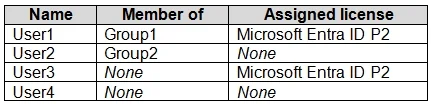
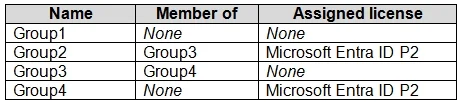
Hotspot Question You have a Microsoft Entra tenant that contains the users shown in the following table. The tenant contains the groups shown in the following table. Which users and groups can be…
The correct answer is User1 = No; User2 = Yes; User3 = No; User4 = Yes; Group1 = Yes; Group2 = Yes. Users can be deleted regardless of group membership or direct license assignment, but groups with directly assigned licenses cannot be deleted until those licenses are removed.
Question
Exhibits
Answer Area
- User1No
- User2Yes
- User3No
- User4Yes
- Group1Yes
- Group2Yes
Explanation
Users can be deleted regardless of group membership or direct license assignment, but groups with directly assigned licenses cannot be deleted until those licenses are removed.
Approach. To determine which users and groups can be deleted, we apply Microsoft Entra ID (Azure AD) deletion rules:
For Users:
- User1: Member of Group1, has Microsoft Entra ID P2 license. Users can be deleted even if they are members of groups or have directly assigned licenses. Deleting the user will automatically remove their group memberships and unassign their licenses. Therefore, User1 can be deleted.
- User2: Member of Group2, no license. User2 can be deleted.
- User3: Not a member of any group, has Microsoft Entra ID P2 license. User3 can be deleted.
- User4: Not a member of any group, no license. User4 can be deleted.
- Conclusion for Users: All users (User1, User2, User3, and User4) can be deleted.
For Groups:
- Group1: Not a member of any group, no license. Group1 has no dependencies or assigned licenses preventing its deletion. Therefore, Group1 can be deleted.
- Group2: Member of Group3, has a Microsoft Entra ID P2 license. A crucial rule for Microsoft Entra ID is that a group with a directly assigned license (Group-based licensing) cannot be deleted until all licenses are first removed from that group. Since Group2 has an assigned license, it cannot be deleted until the license is unassigned.
- Group3: Member of Group4, no license. A group's membership in another group does not prevent its own deletion. Since Group3 has no assigned licenses, it can be deleted.
- Group4: Not a member of any group, has a Microsoft Entra ID P2 license. Similar to Group2, Group4 has a directly assigned license and therefore cannot be deleted until the license is unassigned.
- Conclusion for Groups: Only Group1 and Group3 can be deleted.
Based on this analysis, the correct selections are 'User1, User2, User3, and User4' for users, and 'Group1 and Group3 only' for groups. These match the highlighted selections in the provided Answer Area image.
Common mistakes.
- common_mistake. A common mistake is assuming that a user's group membership or a directly assigned license prevents their deletion. In Microsoft Entra ID, standard users can be deleted regardless of these factors; memberships are removed, and licenses are unassigned automatically. For groups, a critical mistake is to assume a group can be deleted if it has an assigned license (e.g., Group2 or Group4). Unlike users, groups with group-based licenses cannot be deleted directly; the licenses must be explicitly removed from the group first. Another potential mistake is thinking that a group being a member of another group (e.g., Group2 being a member of Group3, or Group3 being a member of Group4) prevents its deletion; this is not the case for group deletion in Microsoft Entra ID.
Concept tested. The core technical concept being tested is the understanding of user and group deletion rules in Microsoft Entra ID (formerly Azure AD), specifically the impact of group membership and license assignments (especially group-based licensing) on the ability to delete these objects.
Reference. https://learn.microsoft.com/en-us/azure/active-directory/enterprise-users/licensing-groups-delete
Topics
Community Discussion
No community discussion yet for this question.