
AZ-104 · Question #687
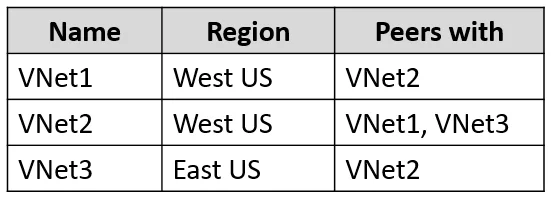
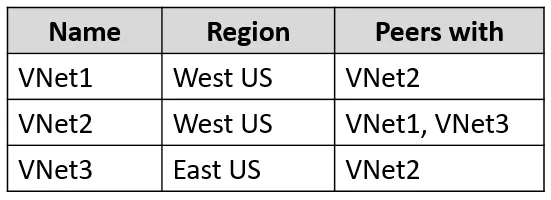
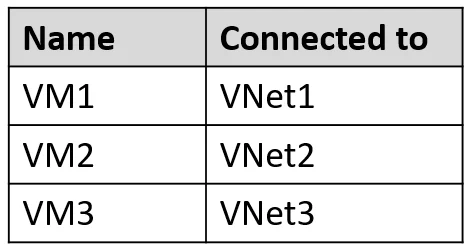
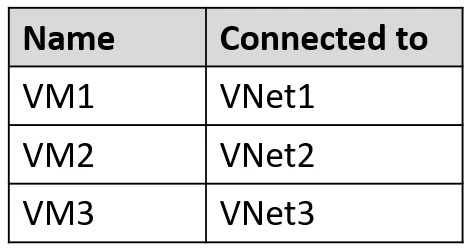
You have an Azure subscription that contains the virtual networks shown in the following table. The subscription contains the virtual machines shown in the following table. All the virtual machines…
The correct answer is B. VM1 and VM2 only. Azure Bastion deployed in VNet1 can connect to virtual machines within VNet1 and virtual machines in directly peered VNets, such as VNet2.
Question
Exhibits
Options
- AVM1 only
- BVM1 and VM2 only
- CVM1 and VM3 only
- DVM1, VM2, and VM3
How the community answered
(40 responses)- A3% (1)
- B83% (33)
- C5% (2)
- D10% (4)
Why each option
Azure Bastion deployed in VNet1 can connect to virtual machines within VNet1 and virtual machines in directly peered VNets, such as VNet2.
This is incorrect because Bastion also supports connecting to VMs in directly peered VNets, so VM2 is also connectable.
Azure Bastion supports connecting to virtual machines in the same virtual network where it is deployed, like VM1 in VNet1. Additionally, Bastion can connect to VMs in VNets that are directly peered with the VNet where Bastion resides, allowing access to VM2 in VNet2 because VNet1 is peered with VNet2.
This is incorrect because VNet1 is not peered with VNet3, preventing Bastion from connecting to VM3.
This is incorrect because VNet1 is not peered with VNet3, which means Bastion cannot establish a connection to VM3.
Concept tested: Azure Bastion VNet peering connectivity
Source: https://learn.microsoft.com/en-us/azure/bastion/bastion-faq#peering
Community Discussion
No community discussion yet for this question.